منظومة Azure IoT – كل ما تحتاج إلى معرفته


إنترنت الأشياء is a network of physical devices that connect to and exchange data with services and other devices over the Internet. The Azure IoT ecosystem plays a significant role in facilitating these connections efficiently.
Microsoft Azure provides a suite of managed IoT services that facilitate secure, bi-directional communication between devices and cloud applications, enabling telemetry ingestion and remote device control. This article brings together practical insights and real-world experience with Azure IoT solutions.
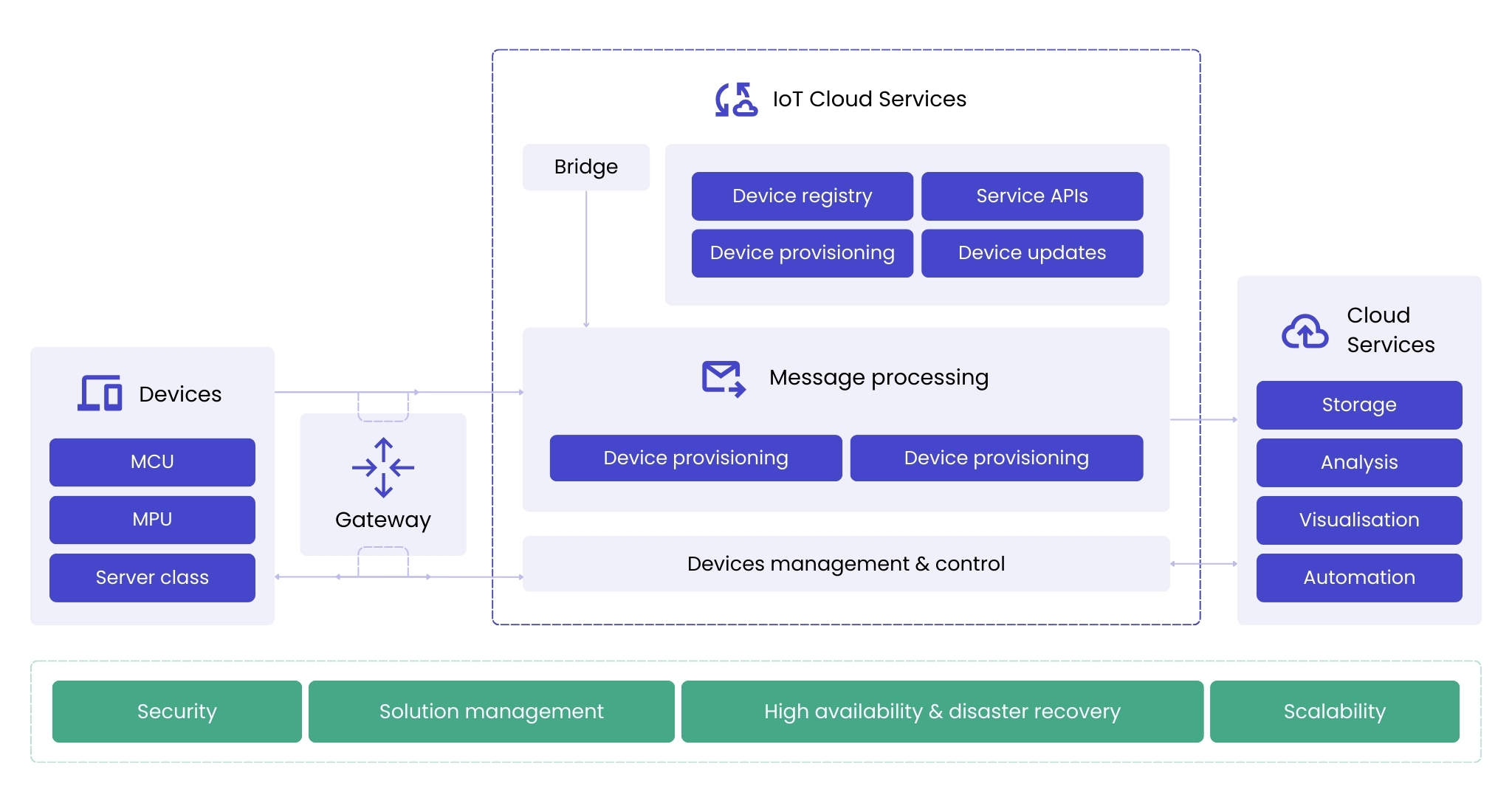
المصدر: https://learn.microsoft.com/en-us/azure/iot/iot-introduction
نظرة عامة على منظومة Azure IoT
Azure offers a comprehensive suite of IoT services that form a powerful ecosystem for managing connected devices, processing data, and enabling digital transformation. The key components include:
- Azure IoT Hub – البوابة السحابية المركزية لإدارة أجهزة إنترنت الأشياء والتواصل معها، وتوفير مراسلة آمنة وقابلة للتوسع وثنائية الاتجاه.
- Azure Event Hub – منصة بث بيانات في الوقت الفعلي مُدارة بالكامل، تستوعب ملايين الأحداث في الثانية وتمكّن من دمج أجهزة إنترنت الأشياء المتنوعة للتحليل والمعالجة.
- خدمة تزويد الأجهزة من Azure (DPS) – يساعد في أتمتة تزويد الأجهزة على نطاق واسع، مما يقلل التدخل اليدوي وأعباء التكوين.
- Azure IoT Plug and Play – يتيح تكاملًا سلسًا للأجهزة باستخدام نماذج محددة مسبقًا، مما يبسّط قابلية التشغيل البيني ويقلل جهد التطوير.
- Azure Digital Twins – ينشئ تمثيلات افتراضية للأجهزة المادية، مما يتيح المراقبة والمحاكاة والتحليل المتقدم.
- Azure IoT Central – منصة تطبيقات إنترنت الأشياء المُدارة التي تبسط اتصال الأجهزة وتصور البيانات ونشر الحلول بأقل جهد تطويري.
- Azure Stream Analytics – A real-time analytics service that can process large data streams, such as telemetry from IoT devices. It allows users to set up real-time dashboards, alerts and integrated analytics solutions.
ما هو Azure IoT Hub؟
Azure IoT Hub is at the core of the Azure IoT ecosystem, serving as a fully managed cloud service that facilitates seamless communication between IoT devices and cloud applications. Acting as a message broker, it enables bi-directional communication, allowing devices to send telemetry data and receive remote commands from IoT applications.
By handling secure messaging, device state management, and telemetry processing, Azure IoT Hub simplifies complex operations so developers can focus on business logic. Once a device is connected, developers can use the Azure IoT SDK to check reported properties, update desired properties, process telemetry, and send cloud-to-device commands.
عند تصميم الاتصالات من الجهاز إلى السحابة، تشمل الاعتبارات الرئيسية:
- أي بروتوكول اتصال (MQTT أو AMQP أو HTTP) هو الأنسب لاحتياجاتك؟
- ما هي الآلية الأكثر كفاءة لإرسال البيانات بين الجهاز والسحابة؟
- كيف ينبغي تحقيق التوازن بين متطلبات الأمان والأداء والتكلفة؟
اختيار آلية الاتصال المناسبة
من أهم أصول حلول إنترنت الأشياء (IoT) القدرة على التواصل بين الأجهزة والتطبيقات. يتيح Azure IoT Hub التواصل من الجهاز إلى السحابة ومن السحابة إلى الجهاز.
يمكن للجهاز إرسال البيانات إلى السحابة عبر الآليات التالية:
- رسالة من الجهاز إلى السحابة (D2C)
- تحديث خصائص Device Twin المُبلَّغ عنها
- إرسال البيانات عبر آلية تحميل الملفات في IoT Hub
يمكن للحوسبة السحابية التواصل مع الجهاز باستخدام:
- رسالة من السحابة إلى الجهاز (C2D)
- تحديث خصائص Device Twin المطلوبة
- استدعاء الطريقة المباشرة المكشوفة على الجهاز
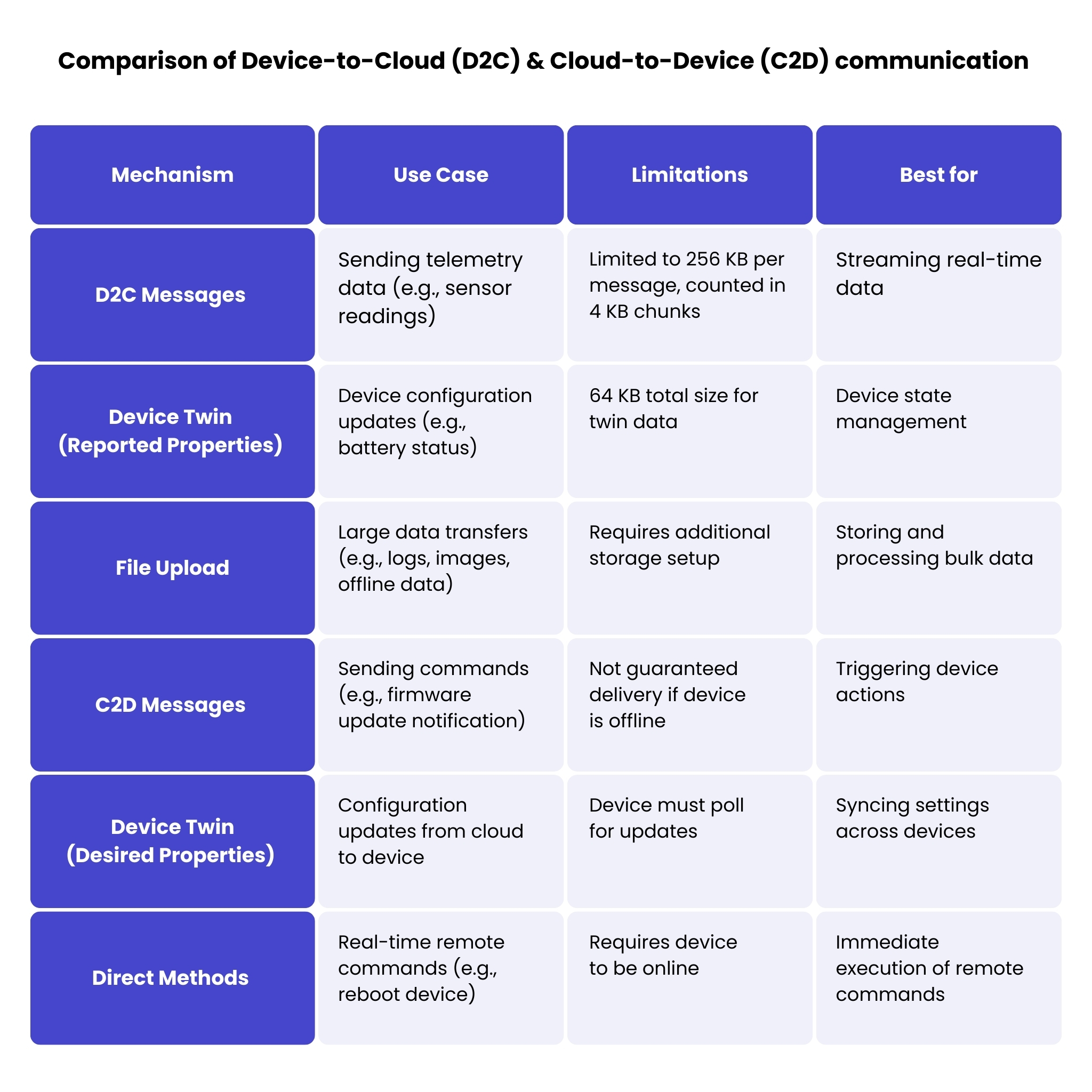
D2C messages are commonly used to send device telemetry data that changes over time, such as temperature or pressure sensor values. D2C messages can also be used to send device alerts or requests to the cloud to perform some action. It is worth mentioning that D2C messages are counted and aligned to 4 KB size, for example, if a message size is 6 KB, it is counted as 2 messages. The maximum size of an Azure IoT Hub Device-to-Cloud message is 256 KB.
حالة استخدام لرسائل D2C: يرسل مستشعر درجة الحرارة بيانات في الوقت الفعلي كل 10 ثوانٍ. إذا تجاوزت القيمة حداً معيناً، يتم تفعيل تنبيه في السحابة.
Device Twin is typically used to exchange information between device and cloud that does not change often and can be treated as configuration, such as frequency of telemetry data sent by device, information about device location, or number of connected sensors. Each device in the Azure IoT Hub has a device twin record in the registry, and this device twin has a reported properties section that can be updated by the device, and a desired properties section that can be updated by the cloud backend. Note that the total size of the device twin – including tags, desired properties, reported properties and metadata – cannot exceed 64KB.
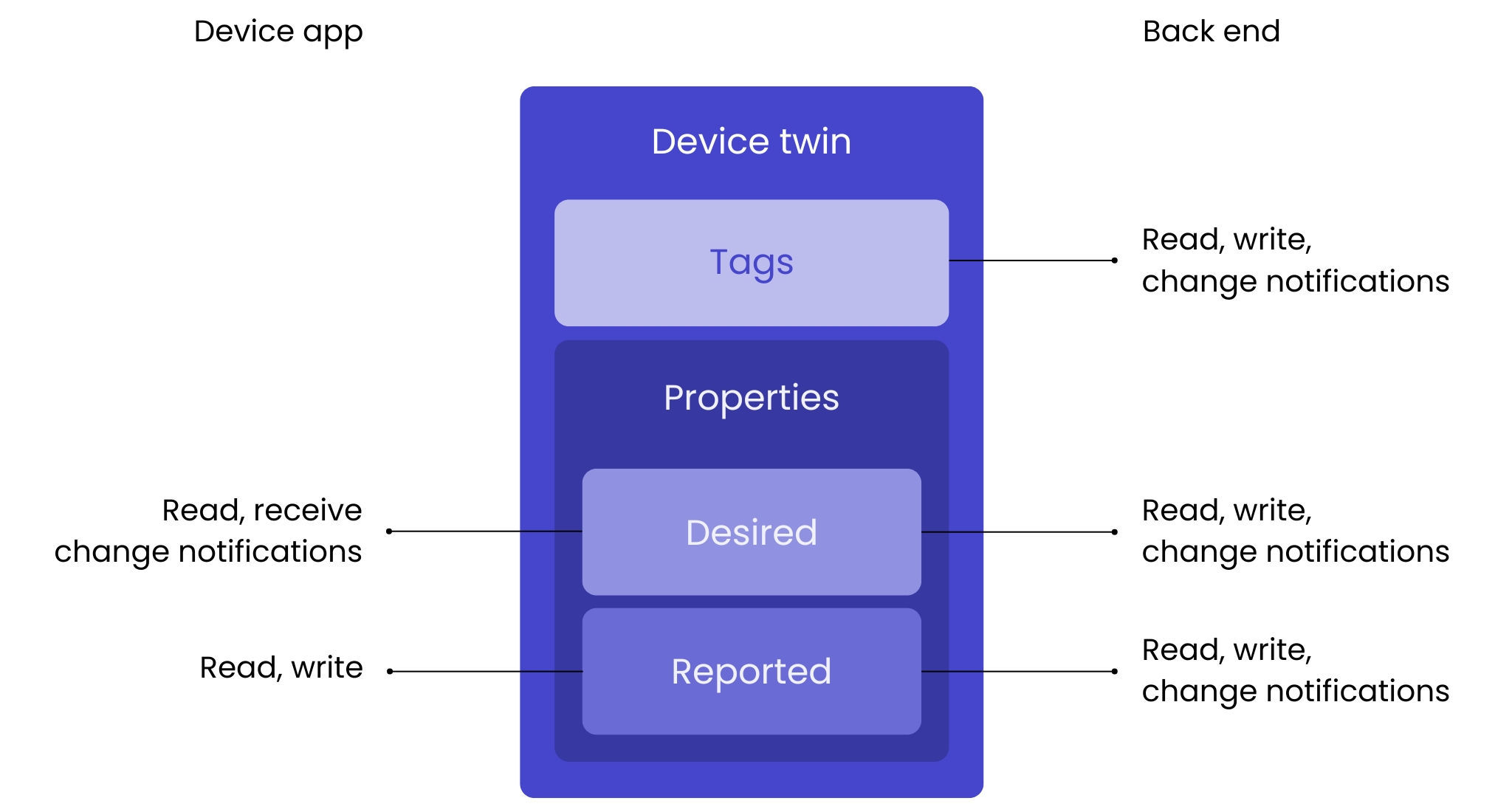
المصدر: https://learn.microsoft.com/en-us/azure/iot-hub/iot-hub-devguide-device-twins
الـ تحميل الملف mechanism can be used when there is a need to send large amounts of data from the device to the cloud. It allows up to 5GB of data to be sent with the cost of just a few small messages to negotiate the connection. It can be useful to send device logs or telemetry collected during internet connection failure.
يتيح IoT Hub الطرق المباشرة exposed on the device to be invoked by providing the device ID, method name and JSON payload. IoT Hub encapsulates all low-level details such as topic name format and message format in MQTT, providing developers with a powerful mechanism to execute commands (such as restart device) on the device or request some data (such as get installed sensors). The Azure IoT SDK allows developers to work with the device as if it were a server with an exposed, simple API.
Choosing the right communication protocol depends on the specific requirements of your devices and the environment in which they operate. The Azure IoT Hub architecture supports multiple protocols for device communication, each suitable for different scenarios.
- MQTT على سبيل المثال، في العلامات التجارية الرائدة للبقالة في بولندا، تُقدَّر الخسائر بنحو 8-12 مليون دولار سنويًا.
- AMQP (بروتوكول متقدم لصف الرسائل) لتطبيقات المؤسسات التي تتطلب ميزات مراسلة قوية وإنتاجية عالية
- HTTP للأجهزة التي لا يمكنها الحفاظ على اتصال دائم أو التي تقع خلف جدران حماية صارمة
- AMQP عبر WebSockets لبيئات المؤسسات حيث تحتاج الأجهزة إلى تجاوز جدران الحماية والخوادم الوسيطة
- MQTT عبر WebSockets للأجهزة خفيفة الوزن التي تحتاج إلى تجاوز جدران الحماية والخوادم الوكيلة
MQTT is the most common choice for IoT deployments due to its lightweight nature. It is important to note that Azure IoT Hub does not support all features of MQTT version 3.1.1 and does not support MQTT version 5.
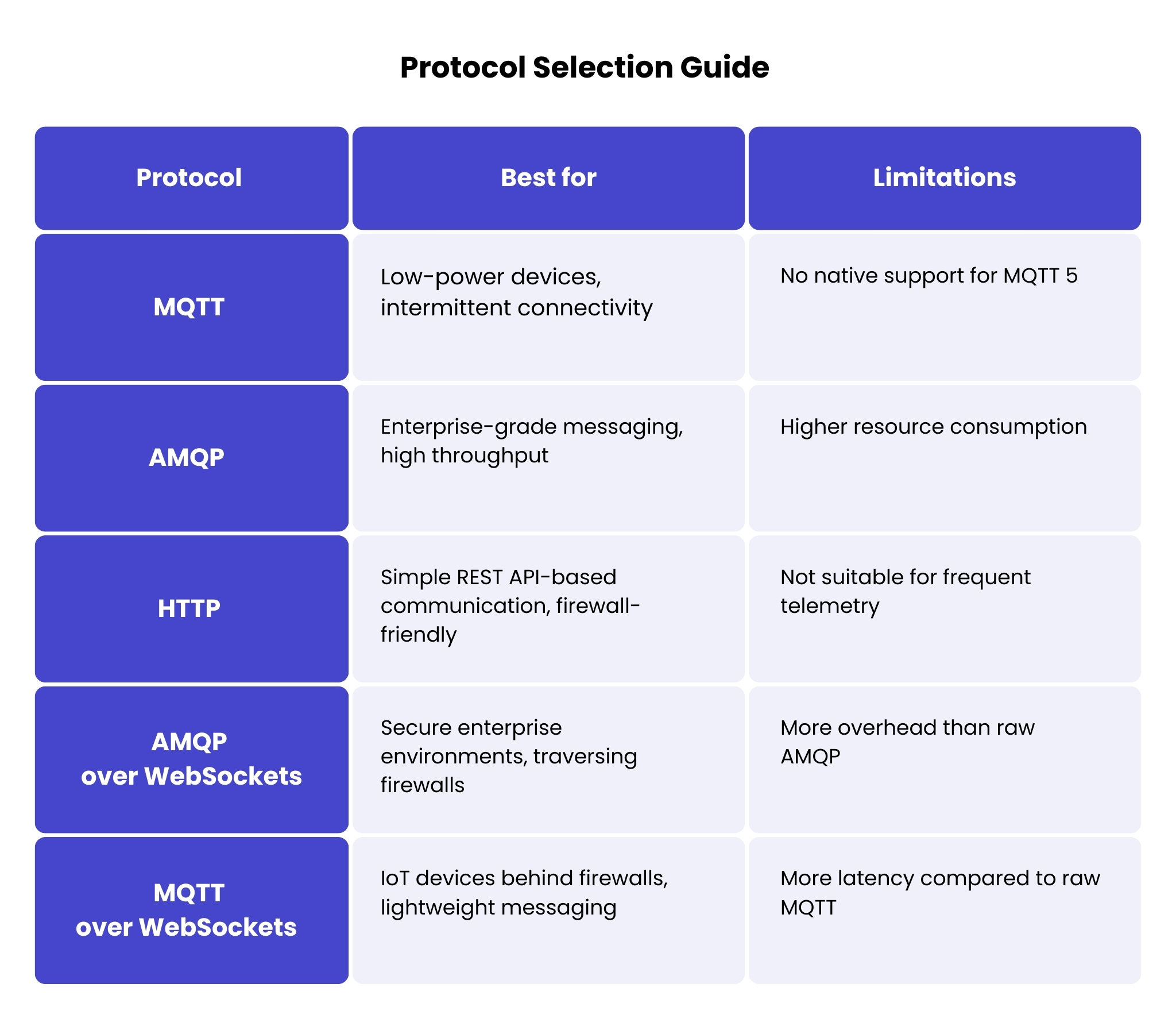
باختصار، يُعد MQTT الأفضل لأجهزة إنترنت الأشياء منخفضة الطاقة، بينما يُعد AMQP مثالياً لمراسلة المؤسسات، في حين تناسب HTTP البيئات المقيّدة بقيود جدار الحماية.
التحديات الشائعة وكيفية التغلب عليها
قيود قابلية التوسع وإنتاجية الرسائل
Scaling an IoT solution requires balancing performance, cost, and device provisioning complexity. Azure IoT Hub provides a Device Provisioning Service (DPS) that enables zero-touch device provisioning at scale, seamlessly and automatically, without any user interaction. You configure it once, and then each new device, when connected to the Internet, automatically connects to the DPS, authenticates, connects to the IoT Hub, and starts communicating with the cloud.
عندما يتعلق الأمر بقابلية التوسع، من المهم مراعاة جوانب مختلفة مثل:
- حجم الأجهزة ونموها – كم عدد الأجهزة النشطة التي سيتم تجهيزها وإدارتها؟ وما هو النمو المتوقع خلال الـ 6–12 شهراً القادمة؟
- معدل تكرار القياس عن بُعد – كم مرة يجب أن ترسل الأجهزة بيانات القياس عن بُعد إلى السحابة؟
- حجم نقل البيانات – ما حجم البيانات التي سيتضمنها كل نقل؟
- ميزانية الصيانة – ما هي الميزانية المخصصة لصيانة الأجهزة شهريًا أو سنويًا؟
يوفر Azure IoT Hub خيارات توسّع مرنة تلبي احتياجاتك، بحيث يمكنك تحسين التكلفة والأداء معًا بكفاءة.
خيارات التوسع:
- التوسع الأفقي – Increase the number of IoT Hub units. For example, if an S1 instance handles up to 400,000 messages per day and your message volume grows to 600,000 messages, you can scale horizontally by adding an additional S1 unit (scaling from 1 to 2 instances).
- التوسع الرأسي – الترقية إلى نقطة سعرية أعلى (على سبيل المثال من S1 إلى S2 أو S3) للاستفادة من زيادة قدرة المعالجة والإنتاجية. يوفّر هذا الخيار أداءً أعلى لكن بتكلفة أكبر.
- التزويد الآلي – استخدم خدمة تزويد أجهزة إنترنت الأشياء من Azure (DPS) لتبسيط وأتمتة تزويد الأجهزة عبر مراكز إنترنت الأشياء المتعددة، مما يسهّل إدارة بيئة موزعة.
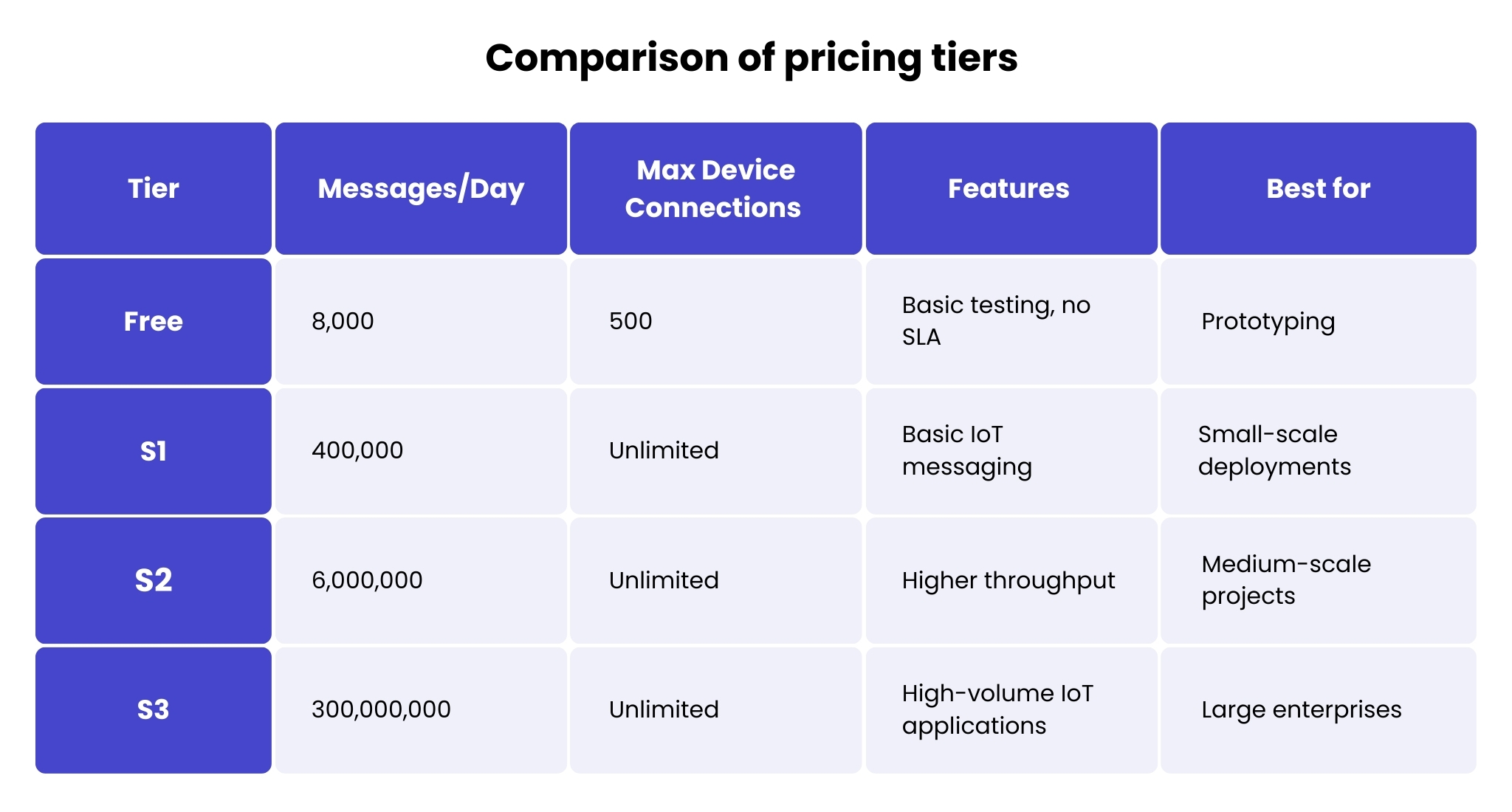
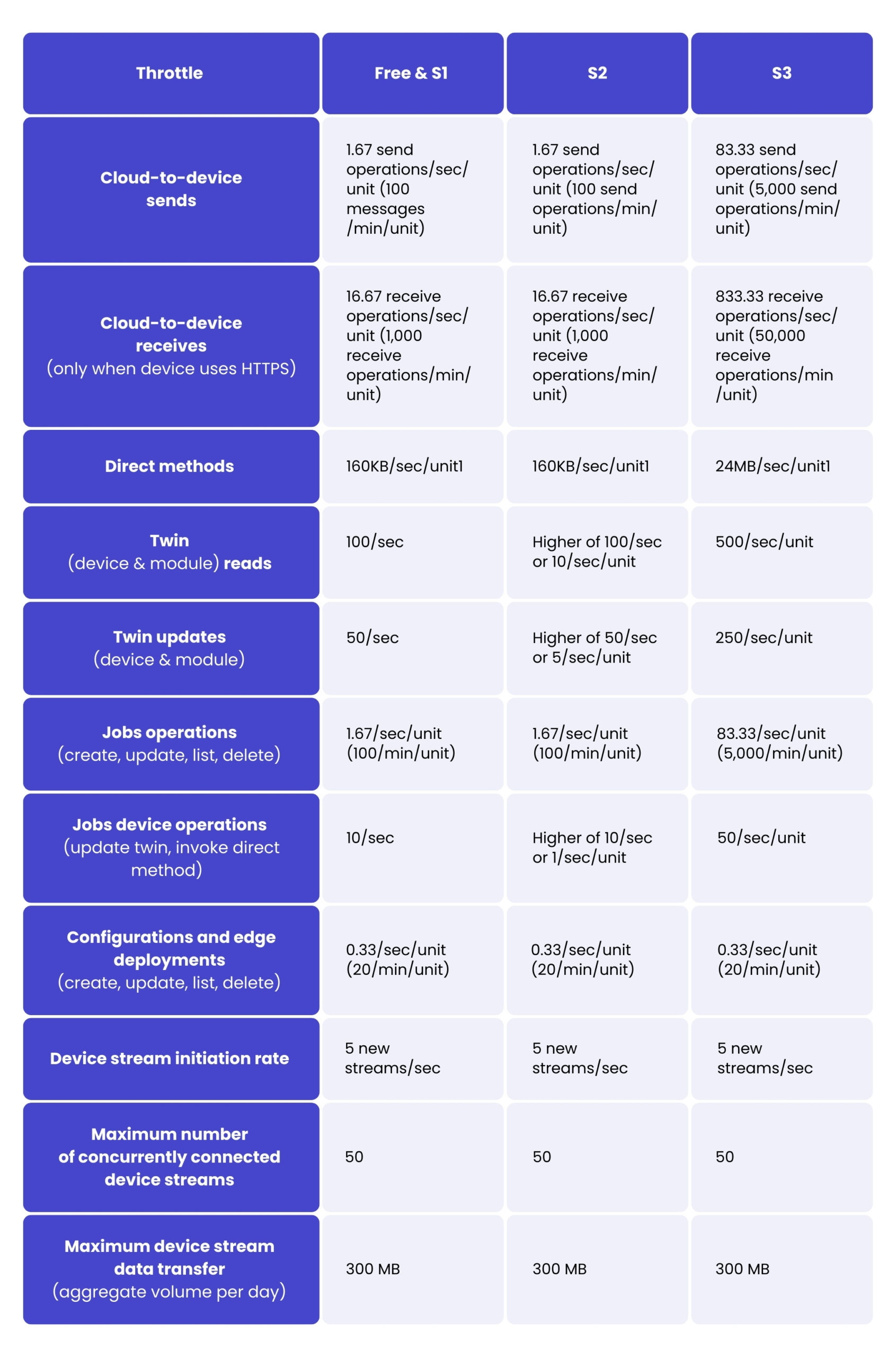
فيما يلي جدول يوضح الحدود والحصص للعمليات لكل فئة:
المخاوف الأمنية
يجب مصادقة كل جهاز قبل أن يتمكن من التواصل مع IoT Hub. ويمكن تحقيق المصادقة باستخدام مفتاح متماثل أو شهادة X.509، وذلك وفقاً لـ الأمن متطلبات الجهاز وقدراته.
المصادقة بالمفتاح المتماثل is ideal for devices with limited computing resources that cannot handle complex cryptographic operations. It offers quick and easy setup, making it suitable for test environments or small-scale deployments. This method is appropriate where security requirements are moderate, and the risk of key compromise is acceptable.
مصادقة شهادة X.509 provides a higher level of security, making it the preferred option when stronger authentication mechanisms are required. It is suitable for devices that can manage certificates and perform cryptographic operations. This method is often required to comply with stringent security standards and regulations and allows scalable certificate management through Certificate Authorities (CAs).
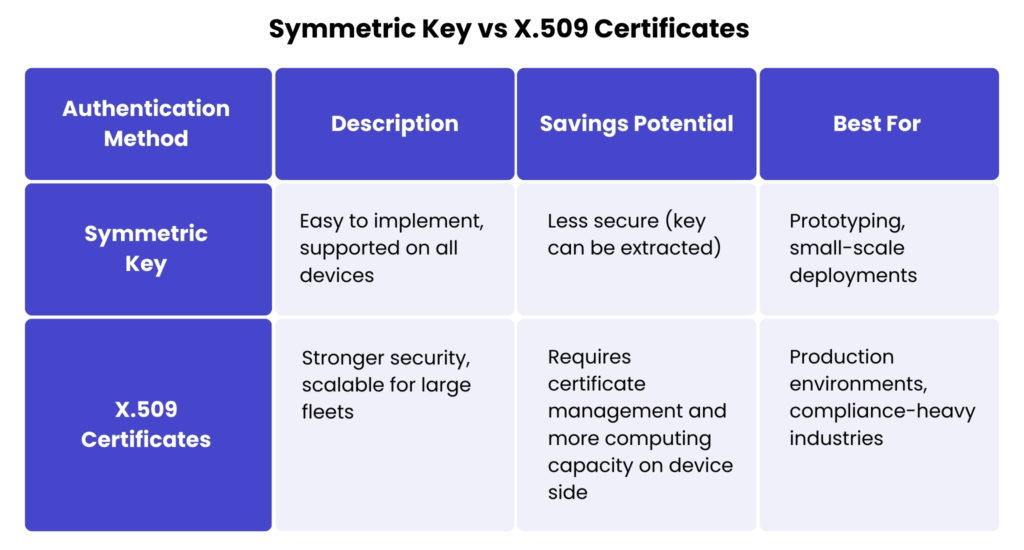
For production environments, X.509 certificates are strongly recommended due to their enhanced security and better scalability, while symmetric keys are more suitable for development or small-scale deployments. When using symmetric keys, regular key rotation is required to mitigate security risks.
مشكلات زمن الاستجابة والاتصال
Depending on the requirements, different strategies and mechanisms can be chosen when designing the solution. For mission-critical applications that require real-time decisions independent of cloud connectivity, Azure IoT Edge enables local processing with cloud synchronisation. If possible, message delivery is acceptable, a retry mechanism can be used along with support for communication protocols such as message queuing or heartbeats.
يستخدم IoT Hub توائم الأجهزة لمزامنة حالات الأجهزة. يمكن للأجهزة استرداد التكوينات المطلوبة عند إعادة الاتصال، مما يضمن بقاءها محدّثة دائمًا.
تحسين التكاليف
عندما يتعلق الأمر بتحسين التكاليف، من المهم مراعاة جوانب مثل:
- كم عدد الأجهزة النشطة المخطط لتجهيزها وإدارتها، وما هو النمو المحتمل
- عدد مرات إرسال بيانات القياس عن بُعد من الأجهزة إلى السحابة
- يُستخدم إنترنت الأشياء أيضاً على نطاق واسع لجعل إدارة الجودة أكثر كفاءة.
- ما هي ميزانية صيانة الأجهزة شهرياً/سنوياً
اعتماداً على الإجابات على الأسئلة أعلاه، يوفر Azure IoT Hub خيارات مختلفة ينبغي أن تساعد المطورين في إيجاد الحل الأنسب.
ما الذي يمكن أن يساعد في تحسين حل إنترنت الأشياء؟
- معدل تكرار القياس عن بُعد – يمكن أن يؤدي تقليل وتيرة نقل البيانات (على سبيل المثال، إرسال البيانات كل دقيقة بدلاً من كل ثانية) إلى خفض التكاليف بشكل كبير.
- حجم حمولة البيانات – استخدم JSON المضغوط أو الحمولات الثنائية لتقليل تكاليف نقل البيانات.
- تجميع الرسائل في دفعات – يؤدي تجميع البيانات قبل إرسالها، بدلًا من إرسال رسائل صغيرة متكررة، إلى تحسين الكفاءة وتقليل التكاليف.
- اختيار فئة التسعير المناسبة – تساعد مراقبة الاستخدام الفعلي على تجنب التزويد المفرط وتضمن توسعًا فعالاً من حيث التكلفة.
Optimising telemetry frequency and payload size can significantly reduce costs without sacrificing critical insight. The general intention is to minimise the number of messages and the size of the payload to the minimum required to meet business needs. For example, if the business case is to know when the temperature changes, it may not be necessary to send the same temperature sensor value every minute.
اطلع على خدماتنا المخصصة لتطوير تطبيقات إنترنت الأشياء
اعرف المزيد
خفض التكاليف من خلال رفع الملفات بكفاءة
In one of our projects, we had a requirement to minimise the overall cost of the solution where devices were collecting data every 15 seconds, but data needed to be sent to the cloud once an hour. In this case, sending telemetry would have been expensive because Azure IoT Hub counts messages in 4 KB chunks. We decided to use a file upload mechanism that sends 1 hour of collected telemetry in 1 file, which dramatically reduced the cost and allowed us to fit the solution into the budget.
أفضل الممارسات لتطوير Azure IoT
From a development perspective, it is important to have tools for developing IoT solutions. Azure provides an IoT SDK that handles low-level details, allowing both device and back-end developers to focus on high-level functionality. If there is a need to prove a business idea, Azure IoT Central can be a good starting point.
Azure Portal has monitoring tools that provide information on various metrics, such as the number of connected devices or the total number of messages sent by devices. IoT Hub has a device registry where it is possible to filter any device and check its Device Twin properties or call Direct Method from Azure Portal. Application Insights provides a comprehensive log analysis tool.
Azure IoT Explorer can help track telemetry, which can be very helpful during development, even before backend development has started.All of this provides developers with out-of-the-box solutions that simplify the development process.
الخاتمة
Building an IoT solution from scratch can be a challenging task, but Azure IoT services and tools help developers build solid, reliable, scalable solutions more easily and quickly. There is no one-size-fits-all solution in IoT, but understanding the capabilities of Azure IoT allows developers to design scalable, secure, and cost-effective solutions tailored to their needs.
إذا كنت تبحث عن إرشادات متخصصة لتحسين حل إنترنت الأشياء (IoT) الخاص بك، تواصل مع فريقنا من خلال ملء النموذج أدناه!
الأسئلة الشائعة
The Azure IoT ecosystem is Microsoft’s collection of cloud services, tools, and integrations designed to connect, manage, and analyse IoT devices at scale. It provides organisations with a unified environment for device onboarding, data processing, security, and application development.
It offers a stable, well-documented platform that supports both small and large deployments. With built-in security, integration with Azure’s wider cloud services, and flexible scaling options, it helps organisations move from prototypes to production without redesigning their entire architecture.
Key elements include Azure IoT Hub for device communication, IoT Edge for processing data closer to the source, Device Provisioning Service for automated onboarding, and Time Series Insights or Azure Data Explorer for analytics. Together, they form a complete environment for managing data flows from devices to dashboards.
Azure IoT Hub handles secure communication, monitoring, configuration updates, and bi-directional messaging. It ensures that devices remain connected, synchronised, and governed in a consistent way, even in complex industrial environments.
IoT Edge allows you to run workloads locally on gateways or edge devices. This reduces latency, lowers cloud costs, and keeps critical operations running even when connectivity is limited. It is particularly useful for scenarios that need real-time reactions.
Yes. Security is integrated into every layer, from encrypted communication to device authentication, identity management, and compliance support. Azure also provides monitoring tools that help teams detect anomalies and maintain long-term trust in the system.
Most organisations use Azure IoT as part of a wider architecture. It integrates well with existing ERP, MES, and data platforms through APIs, connectors, and event-driven pipelines. This allows teams to modernise their IoT landscape without replacing everything at once.
Many teams benefit from working with a partner, such as Spyrosoft, that understands both cloud engineering and operational technology. According to Spyrosoft, combining technical guidance with practical implementation experience helps organisations design IoT solutions that are secure, scalable, and aligned with their long-term goals.




arrow_circle_rightاتصل بنا
تواصل معنا ولنناقش كيف يمكننا مساعدتك

arrow_circle_right مقالات أخرى


