שליטה בפיתוח אפליקציות ל-Apple TV: מדריך מעשי לכל הרמות


Among the major streaming platforms, Apple TV occupies a very specific niche. It doesn’t compete on raw audience size like Android TV or Fire TV; instead, it attracts a smaller but more valuable user base – people who consistently spend more on apps, content and services across Apple devices.
For content creators, this shift in focus means building for Apple TV is less about chasing scale and more about reaching a premium segment that values quality and is willing to pay for it. In this guide, we’ll cover why Apple TV apps matter, the paths to building an app for it, and the best practices that turn a good idea into a product Apple users will actually use.
מדוע פיתוח אפליקציות Apple TV חשוב
Apple TV has quietly become one of the most attractive platforms for content creators, and the reason is simple: the quality of its target audience.
משתמשי Apple באופן עקבי spend nearly twice as much on apps and services compared to other platforms. This isn’t just about having more money – it’s about valuing quality content and being willing to pay for better experiences.
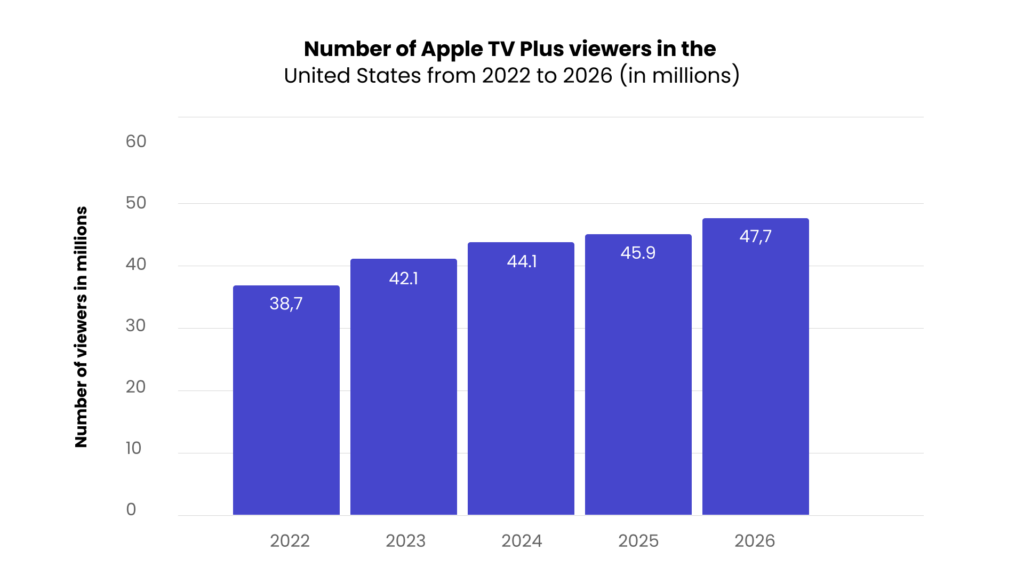
In the United States, Apple TV+ started with כמעט 39 מיליון משתמשים at the end of 2022 and is projected to reach 48 million viewers by 2026. This steady growth shows sustained audience interest rather than quick spikes followed by churn.
בחרו את מסלול הפיתוח של אפליקציית Apple TV שלכם
Building an Apple TV app doesn’t require starting from scratch. You have three distinct approaches, each suited for different situations and skill levels.
גישת פלטפורמה White-label
This is the fastest route to market. White-label providers offer pre-built Apple TV app templates that you can customise with your branding and content. You’ll typically have your app ready in 2-4 weeks without needing any technical expertise.
The trade-off is less customisation flexibility, but you get ongoing support, maintenance, and often cross-platform compatibility (your app works on Android TV, Roku, and other platforms simultaneously). This approach operates on a subscription model, eliminating large upfront expenses.
Best for: Content creators who want to focus on content rather than technology, businesses needing quick market entry, or teams without dedicated tvOS app development resources.

גישת פיתוח מותאמת אישית
פיתוח אפליקציית Apple TV בהתאמה אישית מעניק לכם complete control over basic and advanced features, design, and functionality. You’ll work with developers or agencies to build exactly what you envision, integrating specific features that white-label solutions might not offer.
This is the most expensive option, requiring a significant upfront investment and ongoing maintenance costs. Expect 3-6 months of development time, and you’ll need someone familiar with iOS development since tvOS shares the same foundation.
Best for: Companies with unique key feature requirements, existing technical teams, or businesses where the Apple TV app itself is a core product differentiator.
גישת פיתוח עצמאי (DIY)
לימוד פיתוח Apple TV בכוחות עצמכם is the most budget-friendly option, requiring only the annual Apple Developer account fee. However, expect a significant time investment – even experienced iOS developers need substantial time to understand the specifics of tvOS, while beginners should budget considerably more for learning Swift and tvOS frameworks.
You’ll use the same tools (Xcode) and languages (Swift) as iOS development, which helps if you already have mobile app experience.
Best for: Developers wanting to expand their skillset, startups with tight budgets and flexible timelines, or anyone who enjoys learning new technologies.
כיצד לבנות אפליקציית Apple TV בעצמכם
If you decide to code your own Apple TV application, there are two main routes you can take. Each comes with its own learning curve and trade-offs.
1. פיתוח מאפס
Building an Apple TV app the traditional way means writing code yourself — but the exact setup depends on the operating system you’re using:
- ב-macOS (המסלול המקורי): You use Xcode, Apple’s official environment, to start a new Apple tvOS project. From there, you design the screens, ensure navigation works well with the Apple TV Remote, and add the main features, such as playback, browsing, or subscriptions. Once you’ve tested everything on a real Apple TV, you submit the app through Apple’s App Store Connect for review and release.
- ב-Windows או במערכות הפעלה אחרות: You can design, plan and even write parts of your code on Windows, but you cannot build and submit a tvOS app without macOS. Apple requires the final build and signing process to happen in Xcode on a Mac. If you don’t own one, you’ll need to use a cloud Mac service, a CI/CD pipeline with macOS runners, or a partner agency to handle the final packaging and submission.
In practice, this means you can get started almost anywhere; however, at some point, the app must pass through Apple’s own tools on a Mac before it can reach the App Store.
2. כלים ללא קוד
The alternative is to use a no-code platform that generates the Apple TV app for you. Here, the process is simpler and doesn’t require programming skills:
- You sign up for a platform that supports tvOS apps.
- Pick a template and customise it with your logo, colours and layout.
Upload your videos, organise them into categories or playlists, and set up monetisation (subscriptions, rentals, or ads). - The platform generates a tvOS build, prepares it for App Store Connect, and often manages app updates and compliance on your behalf.
This approach gets you to market much faster, though you work within the limits of the platform — you can’t customise every feature as you could with coding.
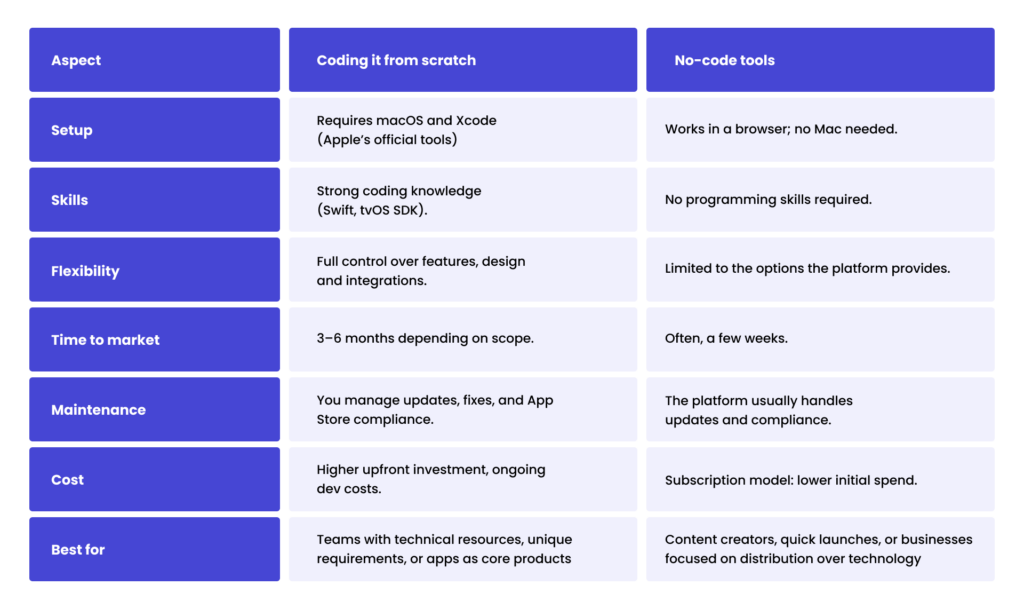
Coding לעומת No-code: ההבדלים המרכזיים
פיתוח אפליקציה ל-Apple TV: שיטות עבודה מומלצות
Now that you understand why Apple TV matters for content creators and the different development approaches available, let’s dive into the essential guidelines that will make your Apple TV app development successful.
These app development best practices apply regardless of which path you choose – whether you’re using a white-label platform, custom tvOS app development services, or building your tvOS app yourself.
שליטה בניווט מבוסס מיקוד
Your Apple TV app works differently depending on the streaming device. On iPhone and iPad, users tap directly on what they want to select. However, on Apple TV hardware, users navigate using the directional buttons on the remote.
Think of focus like a cursor that highlights one element at a time. Users move this highlight up, down, left, or right using the remote control, then press select to activate whatever is currently highlighted.
Sounds complicated? Don’t worry, Apple has built a system called מנוע ה-Focus that automatically determines where focus should move when users press directional buttons. You don’t need to manually program every navigation path.
The Focus Engine analyses your big screen layout and creates navigation routes between elements. When someone presses “right,” it finds the nearest focusable element to the right and moves the highlight there.
Design requirements for the focus to work properly:
- אינדיקטורים חזותיים ברורים: Use bold borders, background colour changes, or scaling effects so users can see which element is selected
- ריווח עקבי: Keep even distances between buttons and UI elements – irregular layouts confuse the automatic navigation
- פקדי UIKit סטנדרטיים: Use Apple’s built-in buttons and text fields when possible, as they already have proper focus behaviour
- פריסות פשוטות: Grid-like arrangements work best with four-directional remote control navigation
Remember to test your tvOS app using an actual Apple TV remote. If focus movement feels unpredictable during testing, simplify your layout until navigation becomes intuitive.
התמודדות עם אתגרי קלט טקסט
Text input on Apple TV is challenging because users navigate an on-screen keyboard using the remote, requiring multiple button presses for simple entries.
What can you do? Consider alternatives that eliminate typing:
- יכולות שליטה קולית וחיפוש קולי
- QR codes for login (users scan with their phones)
- Auto-complete suggestions for common entries
- Picker controls instead of text fields for known options
- טפסים מאוכלסים מראש עם נתוני משתמש קיימים
And what if the text input is necessary? Choose the right keyboard type based on user experience:
- קלטים קצרים (סיסמאות, מונחי חיפוש): Use UIAlertController – quick pop-ups that don’t interrupt the main user interface flow, perfect when users need to enter just a few characters.
- שדות מרובים (טפסי הרשמה): Use UITextField with full-screen keyboards that include Next/Previous navigation, eliminating the need to exit the keyboard, refocus on the next field, and reopen it.
- פונקציונליות חיפוש: Use UISearchController with inline keyboards that display all characters on one line, providing immediate visual feedback and working well for predictive text.
The key difference is the user workflow. Pop-ups work for single, quick entries. Full-screen keyboards prevent the need for constant switching between fields. Inline keyboards keep users focused on search results while typing.
עיצוב למכשירים משפחתיים משותפים
Apple TV serves entire households, unlike personal phones or tablets. Multiple family members use the same device, creating unique design challenges for your Apple TV app.
שקלו תרחישי ריבוי משתמשים:
- החלפת פרופילים: Allow quick switching between family member accounts without full logout/login cycles.
- בקרת הורים: Implement age-appropriate content filtering that parents can easily configure.
- המלצות מותאמות אישית: Keep individual viewing history and preferences separate while sharing the same device.
- שיקולי פרטיות: Avoid displaying personal information prominently on shared screens.
השתלבו עם מערכת האקוסיסטם של Apple
One of the key advantages of Apple TV is its seamless integration with the broader Apple ecosystem. Users expect their apps to feel integrated, not isolated. By making use of Apple’s built-in features, you can create an experience that feels premium from day one.
בפועל, משמעות הדבר היא:
- התחברות עם Apple: Offer one-click, secure login without forcing users to type long passwords on a remote device.
- פקודות קוליות של Siri: Let users search or start content simply by asking Siri.
- תמיכה ב-AirPlay: Seamlessly cast photos, videos, or music from iPhone, iPad, or Mac directly to your TV.
- אינטגרציה עם Top Shelf: Make your Apple TV app more visible on the Apple TV home screen by displaying recommendations, “Continue Watching”, or featured programmes above the app icon.
For video content creators, these features are not just add-ons – they are what make an app feel truly native, increasing both usability and long-term user engagement.
בחרו את מודל ההכנסות שלכם בשלב מוקדם
In Apple TV app development, your business model sets the shape of the on-screen experience. Decide it first, and your flows stay simple, the copy stays clear, and the tech won’t fight the design.
- מנויים (SVOD): A model built for publishers who release fresh video content on a regular basis. The experience usually follows a short path: start trial → choose plan → watch (supported by one-tap checkout with Sign in with Apple). Interfaces lean heavily on “Continue watching”, personalised recommendations and clear renewal text. Revenue tends to be predictable, but pricing transparency and catalogue depth are key to keeping churn low.
- השכרה או רכישה (TVOD): Often chosen for premieres, niche titles or one-off events. The interface highlights bold ‘Rent’ and ‘Buy’ actions, clearly shows the rental window (e.g., 48 hours), and organises purchased titles into a tidy Library (4K/Dolby Vision ready). Revenue comes in spikes, so clarity around pricing and availability is essential.
- חינם (AVOD): Designed for reach and price-sensitive audiences. Playback includes light, predictable ad breaks, smooth resume after interruptions, and a clear value exchange: free access in return for occasional ads.
- היברידי (AVOD + SVOD): A mix where viewers start on a free tier but see a clear, unobtrusive path to upgrade. A single persistent upgrade option is available in the player, with benefits clearly outlined in plain English: remove ads, download episodes, gain early access, and enjoy higher quality. Checkout is usually kept to two or three steps on the Apple TV Remote, often tied to Sign in with Apple for simplicity.
Ready to bring your Apple TV app idea to life?
Apple TV app development isn’t just about putting your content on the big screen. It’s about creating tvOS apps that feel natural to use, integrate smoothly with the wider Apple ecosystem, and deliver a user interface that works for families gathered around one device.
Whether you build through coding or no-code tools, the end goal is the same: Apple TV applications that meet Apple’s guidelines, scale across Apple devices, and keep users engaged through intuitive design and clear monetisation flows.
If you’re exploring Apple TV development, our team at Spyrosoft can help on whole development cycle. We specialise in creating apps that combine strong app performance with innovative solutions, ensuring your content reaches the right audience in the right way.
גלו את שירותי המדיה והבידור שלנו and see how we can help you create TV apps that drive success.
שאלות נפוצות
Apple TV attracts a smaller but high-value audience that spends more on apps and services than users on other platforms. For content creators, it’s a premium market focused on quality and long-term engagement rather than scale.
Yes. While it has fewer users overall, Apple TV users make more in-app purchases, subscribe more often, and expect premium experiences. This makes the platform highly valuable for publishers and content owners.
Yes, the final build, signing, and App Store submission must be done on macOS using Xcode. You can write code elsewhere, but the packaging and publishing require a Mac.
Yes. No-code platforms let you create a branded Apple TV app using templates and simple configuration. They handle publishing, updates, and compliance but offer less flexibility.
Yes. Spyrosoft supports the full TV app development cycle — from strategy and design to coding, testing and App Store submission — for both custom and white-label solutions.


arrow_circle_rightצרו קשר
Get expert support for your Apple TV development

Bartlomiej Lozia
מנכ"ל Spyrosoft BSG
![[hero] media and entertainment - vega os](/wp-content/uploads/2025/10/hero-media-and-entertainment-vega-os-scaled-1-1024x681.jpg)
![[hero] media and entertainment - essential ott metrics](/wp-content/uploads/2025/10/hero-media-and-entertainment-essential-ott-metrics-scaled-1-1024x683.jpg)
![[hero] media and entertainment - Subscriber acquisition vs retention](/wp-content/uploads/2025/09/hero-media-and-entertainment-subscriber-acquisition-vs-retention-scaled-1-1024x683.jpg)