5 מסגרות העבודה המובילות לממשקי HMI משובצים לשנת 2025


Embedded human-machine interfaces, or HMIs, require UI frameworks capable of delivering smooth, visually rich, and highly responsive graphics across diverse hardware platforms, from low-power microcontrollers used in everyday appliances to advanced SoCs powering automotive digital cockpits.
Below, we explore five of the leading embedded UI frameworks, both open-source and commercial, that are widely adopted in automotive, industrial, and consumer electronics. For each, you’ll find an overview of the vendor or developer, core features, known limitations, best-fit use cases, licensing details, and links to official resources.
Qt – Mature, versatile framework for embedded UI
Qt, developed by The Qt Company, is one of the most established frameworks for building graphical user interfaces and applications in C++. It offers a mature toolkit that scales from desktop environments to embedded devices, making it a popular choice for automotive, industrial, medical, and consumer HMIs.

ארכיטקטורה ומודל תכנות
Qt provides flexibility in how UIs are built:
- Qt Widgets / C++: For traditional or low-level UI programming.
- Qt Quick / QML: A declarative language with JSON-like syntax and JavaScript for logic. This approach enables designers and developers to define interfaces, animations, and state-driven behaviour rapidly.
Behind the scenes, Qt Quick relies on a scene graph rendering model. UIs are represented as a tree of items in memory and rendered via OpenGL, OpenGL ES, or other graphics APIs. This retained-mode rendering allows batching and optimisation, which improves GPU performance and keeps animations fluid, even on embedded hardware.
Qt separates the UI layer (QML, Qt Quick, or Widgets) from the backend logic (C++, Python, etc.). Interaction is handled via its well-known signals and slots mechanism, supporting highly responsive, event-driven applications.
תמיכה בפלטפורמות וכלי עבודה
Qt’s biggest strength is cross-platform coverage:
- שולחן עבודה: Windows, Linux, macOS
- נייד: Android, iOS
- מוטמע: Linux (with Wayland or framebuffer), QNX, RTOS, and Qt for MCUs (optimized for bare-metal or RTOS-driven devices).
This scalability allows the same framework to power high-end in-vehicle infotainment systems, industrial dashboards, and low-footprint microcontroller displays.
The ecosystem includes robust development tools:
- Qt Creator: Official IDE with code editing, debugging, and GUI design.
- Qt Design Studio: Visual environment for creating QML-based UIs and animations.
- כלי פרופיילינג וניפוי באגים: Such as GammaRay and Qt Inspector for live inspection on target devices.
These shorten iteration loops between design and development — crucial in fast-moving sectors like automotive HMI.
חוזקות
- שימוש חוזר חוצה פלטפורמות: One codebase can serve desktop, embedded, and mobile systems, including specialised OSes like QNX.
- ביצועים מקוריים: Applications compile to C++ and run close to the metal, making Qt suitable for real-time UIs like instrument clusters or medical device interfaces.
- ממשק משתמש דקלרטיבי עם QML: Ideal for rich, animated, and touch-driven HMIs, with support for shaders and 3D content.
- ספריות נרחבות: Networking, multimedia, sensor APIs, 2D/3D graphics, and ready-to-use UI components.
- סינרגיה בין עיצוב לפיתוח: Built-in tools support collaboration between engineers and designers.
- אמינות מוכחת: Used in long-lifecycle products across automotive (e.g., MBUX in Mercedes-Benz), medical, and industrial automation.
רישוי ותמיכה מסחרית
Qt מוצע תחת רישיון כפול:
- קוד פתוח (GPLv3, LGPLv3): Suitable for certain non-commercial or dynamically linked use cases.
- רישיון מסחרי: Includes static linking rights, commercial-only modules (e.g., Qt for MCUs), long-term support, and guaranteed professional assistance.
In regulated industries (automotive, medical, aerospace), organisations typically choose the commercial route for compliance, confidentiality, and lifecycle stability. The Qt Company and its partners (e.g., KDAB, ICS) provide professional services, consulting, and certified developer training.
Slint – lightweight embedded UI toolkit in Rust/C++
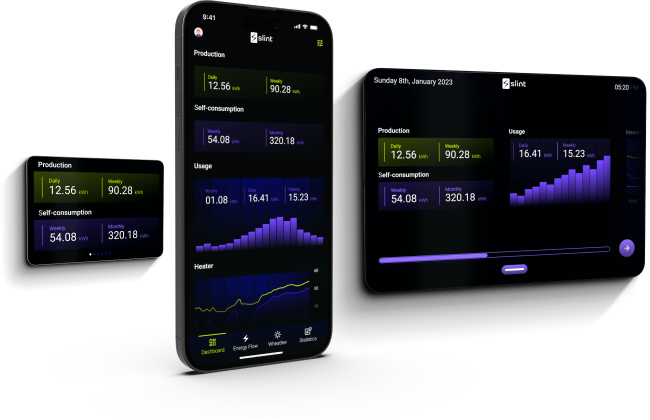
Slint is a modern, lightweight UI toolkit developed by SixtyFPS GmbH (formerly “SixtyFPS,” reflecting its goal of consistently delivering 60 FPS graphics). It’s open source, actively maintained, and available under flexible licensing models, with commercial support for embedded projects.
ארכיטקטורה ומודל תכנות
Slint takes a declarative approach inspired by QML but designed to be leaner and more predictable. Interfaces are defined in .slint files using a domain-specific, JSON-like language that describes components, layouts, states, and behaviour.
The Slint compiler translates these files into native Rust or C++ code. This design removes the need for a heavy runtime or embedded scripting engine, resulting in extremely small binaries and fast startup. The core runtime requires under 300 KB of RAM, making it well-suited for microcontrollers and constrained devices.
Its property-binding system ensures UI elements update reactively when data changes, similar to Qt or React. Rendering backends are modular: OpenGL ES for GPU-accelerated platforms, a lightweight software rasteriser for MCUs without a GPU, or integrations with Qt and Skia for more advanced use cases.
While Slint is implemented in Rust for memory safety, developers can work in C++, Python, or JavaScript through generated bindings. This allows safe, modern UI development without forcing a full Rust stack.
תמיכה בפלטפורמות וכלי עבודה
Slint was designed for embedded systems first, but it runs across desktop, web, and mobile as well:
- מוטמע: Linux with or without a windowing system, bare-metal microcontrollers with framebuffers or SPI displays.
- שולחן עבודה: Windows, macOS, Linux.
- אינטרנט: WebAssembly עם רינדור WebGL.
Its developer experience focuses on speed and integration:
- תצוגה מקדימה חיה: Hot reload with VS Code extension and language server.
- תוסף Figma: Direct export of UI elements from design to Slint code.
- בודק וניפוי באגים: UI property editing, device previews, and CI-ready testing.
- ממשקי API רב-לשוניים: Native support for Rust, C++, Python, and JavaScript.
חוזקות
- טביעת רגל קלת משקל במיוחד: <300 KB runtime, no garbage collector, fast startup.
- ביצועים גבוהים: Smooth 60 FPS animations even on modest embedded hardware.
- בטיחות מבוססת Rust: Memory-safe core with C++ APIs available for gradual adoption.
- ממשק משתמש ריאקטיבי דקלרטיבי: Simplifies dynamic HMIs with automatic property updates.
- סביבת ריצה ללא תלויות: No OS or heavyweight framework requirements.
- תהליך עבודה בין מעצב למפתח: Live previews and Figma integration accelerate iteration.
- אינטגרציה גמישה: Can coexist with Qt or other frameworks to support hybrid migrations.
רישוי ותמיכה
Slint משתמשת במודל רישוי כפול:
- GPLv3 עבור פרויקטים בקוד פתוח.
- Apache 2.0 (ללא תמלוגים) for proprietary desktop, mobile, and web apps.
- רישיון מסחרי for embedded systems, including direct vendor support and long-term options.
This flexible approach removes runtime royalties for many platforms and lowers entry barriers compared to traditional frameworks. Commercial licensing is priced to be accessible to startups and smaller OEMs, with support provided directly by the Slint team.
Flutter – high-productivity UI toolkit with custom rendering
Flutter is an open-source UI framework created by Google, first released in 2017 and rapidly adopted from 2019 onward. Originally designed for mobile apps, Flutter has since expanded to desktop, web, and embedded devices. It is also the default UI layer for Google’s Fuchsia OS.
ארכיטקטורה ומודל תכנות
Flutter’s core distinction is that it renders every pixel itself via its own graphics engine, instead of relying on native OS widgets. This approach ensures consistent look and feel across platforms, while also enabling highly customised UIs.
Applications are written in Dart, Google’s modern object-oriented language designed for UI development. Dart supports features such as async/await, a declarative reactive framework, and both JIT (for fast development cycles with Hot Reload) and AOT compilation (for native ARM/x86 binaries in production).
The programming model is widget-based and declarative: developers define a widget tree in Dart code that describes UI structure and behaviour. When state changes, Flutter rebuilds the necessary widgets, conceptually similar to React but without a JavaScript bridge.
מתחת למכסה:
- מנוע רינדור: Uses Skia (also used in Chrome) for GPU-accelerated graphics; transitioning to Impeller, a next-gen runtime that reduces shader compilation stutter and provides more predictable performance.
- ארכיטקטורה שכבתית: A C/C++ core handles text, graphics, and the Dart VM, while the majority of the framework (widgets, gestures, animations) lives in Dart for flexibility.
ערוצי פלטפורמה: Native integration via bridges to Android (Java/Kotlin), iOS (Swift/Obj-C), or other system APIs, enabling device access (camera, sensors, etc.).
The result is fluid 60–120 fps rendering of complex UI, animations, and graphics, if hardware acceleration is available.
תמיכה בפלטפורמות וכלי עבודה
Flutter started as Android/iOS-only but now supports:
- נייד: Android, iOS (יציב).
- שולחן עבודה: Windows, macOS, Linux.
- אינטרנט: באמצעות CanvasKit/WebAssembly.
- מוטמע: באמצעות embedders מותאמים אישית.
Google provides example embedders for Linux framebuffer, and companies like Toyota have successfully deployed Flutter in automotive infotainment systems (AGL/Wayland), citing smooth performance and developer productivity via Hot Reload.
כלי העבודה הם חוזקה משמעותית:
- SDK ו-CLI (Flutter): מנהל בניות, הרצות ופריסות.
- טעינה חמה: Near-instant injection of Dart code changes into a running app.
- כלי פיתוח: Web-based suite for profiling, memory inspection, widget trees, and performance timelines.
- תוספי IDE: Deep support for VS Code, Android Studio/IntelliJ.
- כלי עיצוב ממשק משתמש: While Flutter lacks an official WYSIWYG editor, third-party tools (e.g., FlutterFlow, תוסף Adobe XD) allow drag-and-drop prototyping that generates Dart code.
- בדיקות: Built-in framework for unit, widget, and integration tests, including gesture simulation.
- נגישות ובינלאומיות: Semantics tree, right-to-left support, and global font handling via ICU.
שיקולי חומרה וביצועים
Flutter assumes a GPU-capable environment (OpenGL ES 2.0+/Vulkan). Memory and storage footprint is modest by mobile standards (release builds typically 10–20 MB), but too heavy for MCUs. Suitable targets include Raspberry Pi 4, NXP i.MX8M, and comparable embedded Linux platforms. Low-power CPUs without GPU acceleration (e.g., i.MX6 ULL) struggle.
חוזקות
- בקרת ממשק משתמש מותאמת אישית: Full rendering stack allows branded, highly animated UIs without OS constraints.
- ביצועים חלקים: 60–120 fps rendering with predictable timing (especially with Impeller).
- שימוש חוזר בקוד חוצה פלטפורמות: Single Dart codebase spans mobile, desktop, web, and embedded.
- פרודוקטיביות מפתחים: Hot Reload + declarative widgets = very fast design iteration.
- מערכת אקולוגית וקהילה: Large package ecosystem (e.g., MQTT, Modbus, Bluetooth), plus strong Google backing.
- עיצוב רספונסיבי והתאמת ערכות נושא: APIs for adapting to multiple screen sizes, resolutions, and orientations.
רישוי ותמיכה
Flutter is licensed under BSD, making it royalty-free and permissive for commercial projects. Google and the open-source community maintain it, but unlike Qt or commercial HMIs, there is no official enterprise support program. Instead, companies often rely on consultancies or the global developer community.
Google itself uses Flutter in production (e.g., Google Pay, Fuchsia), reinforcing its strategic status. While some concerns exist about Google’s project longevity, Flutter has consistently grown, with continuous investment into embedded use cases.
Is it for you? Flutter is attractive for industries needing polished, smartphone-like interfaces on embedded Linux hardware (e.g., automotive, medical devices, consumer electronics). It combines modern developer ergonomics, smooth performance, and cross-platform reach — provided the target system has sufficient GPU resources.

React Native – bridging web and mobile for cross-platform UIs
React Native (RN) is an open-source framework developed by Meta (Facebook) and released in 2015. It extends the popular React paradigm from the web to mobile, allowing developers to build native iOS and Android apps with JavaScript and TypeScript. While its focus is mobile, the ecosystem now includes extensions for desktop, web, and even embedded use cases.
ארכיטקטורה ומודל תכנות
React Native adopts a declarative, component-based model similar to React for the web. Developers write UI in JSX (XML-like syntax) and style with JavaScript objects that resemble CSS. Logic runs in JavaScript/TypeScript via engines like Hermes (lightweight, RN-optimised) or V8. Each RN component maps directly to a native widget — for example, <Text> becomes a UILabel on iOS or a TextView on Android. This approach distinguishes RN from Flutter, as RN leverages the native rendering stack rather than re-implementing its own.
באופן מסורתי, RN השתמשה בגשר JavaScript:
- The JS runtime managed application state and logic.
- An asynchronous bridge communicated diffs (from React’s virtual DOM) to the native layer.
- The native layer updated or created UI widgets accordingly.
This worked, but frequent cross-bridge communication could introduce latency and performance overhead.
To address this, RN is rolling out The New Architecture:
- מנוע רינדור Fabric: A C++-based rendering layer that unifies logic across Android and iOS, enabling synchronous, batched updates and smoother UI.
- TurboModules: Faster, lightweight native module system with direct JS-to-native calls.
- מנוע Hermes: Optimised for fast startup and reduced memory usage.
This shift significantly improves performance, consistency, and scalability in complex apps (since RN 0.70+).
For developers, RN feels familiar: functional/class-based components, hooks for state, and access to the vast npm ecosystem.
תמיכה בפלטפורמות וכלי עבודה
יעדים עיקריים:
- iOS ו-Android (תמיכה מלאה).
יעדים מורחבים:
- Windows/macOS: Microsoft’s RN forks for UWP, Win32, and Cocoa apps.
- אינטרנט: React Native Web maps RN components to DOM elements for partial code sharing.
- משובץ/Linux: Experimental ports (react-native-linux, Yocto builds) and common use via מערכות משובצות מבוססות Android (e.g., smart TVs, IVI). Amazon reportedly uses RN for Prime Video’s TV app.
- אחרים: tvOS, Raspberry Pi (מונע על ידי הקהילה).
שרשרת כלים:
- CLI + metro bundler: עבור תהליכי בנייה/הרצה.
- רענון מהיר: Preserves state while injecting JS changes in real time.
- ניפוי שגיאות: Chrome DevTools, VS Code, React DevTools, plus Flipper לבדיקת פריסה, רשת ויומני רישום.
- סביבות פיתוח: בדרך כלל,
- כלי עיצוב: No official WYSIWYG; devs rely on Storybook for isolated component development or hand-coded UI from design specs.
שיקולי חומרה וביצועים
- דרישות: A capable CPU and several hundred MB of RAM (modern phones are ideal).
- רינדור: RN uses the OS’s native rendering pipeline, not its own GPU engine. Performance is generally “native” for widgets like lists and scroll views.
- אילוצים: Bridge overhead can stress weaker CPUs or frequent state-updates. Fabric mitigates this by moving rendering logic closer to native.
- התאמה למערכות משובצות: RN works best on Android-based devices (TVs, IVI, set-top boxes) but is too resource-heavy for MCU-class hardware.
חוזקות
- העברת מיומנויות מהאינטרנט למובייל: React devs can move into native app development with minimal retraining.
- מראה ותחושה מקוריים: RN uses actual native widgets, giving apps platform-appropriate UX out of the box.
- מערכת אקולוגית רחבה: Thousands of libraries/plugins for device APIs, charts, animations, Bluetooth, etc.
- איטרציה מהירה: Fast Refresh streamlines UI prototyping and bug fixing.
- שיתוף קוד חוצה-פלטפורמות: Major code reuse between iOS/Android, with frameworks like Expo enabling unified workflows across web and mobile.
- קהילה ואימוץ: Widely used by Meta, Microsoft (Teams), Tesla, Shopify, and others. Strong open-source momentum and corporate contributions.
- פתח מילוט נייטיבי: Developers can implement specific components in native iOS/Android code when performance demands it.
- כלי דיבוג בוגרים: Flipper, Chrome DevTools, and React DevTools give full visibility into RN apps.
רישוי ותמיכה
- רישיון: MIT, permissive and royalty-free. No copyleft obligations.
- תמיכה: Maintained by Meta with major contributions from Microsoft and the open-source community. No official enterprise support, but many consultancies specialise in RN.
- תלויות: RN relies on Xcode (for iOS), Android SDK, and native build chains — troubleshooting often spans RN and platform-level issues.
React Native is appealing where Android-based embedded systems are in play (e.g., infotainment, smart displays, TVs). It allows leveraging existing JavaScript talent, accelerates cross-platform development, and benefits from a huge ecosystem, though resource constraints and reliance on native bridges must be carefully evaluated.
Unreal Engine’s Slate UI – real-time 3D UI framework
Slate UI is the low-level user interface framework inside Epic Games’ Unreal Engine. Originally created to power game HUDs and the Unreal Editor itself, it now underpins all in-game and editor UIs in UE4/UE5. While not distributed as a standalone toolkit, it comes bundled with Unreal Engine and is increasingly used for non-gaming applications, most notably automotive HMI.
Above Slate sits UMG (Unreal Motion Graphics), a higher-level, Blueprint-driven UI system. UMG wraps Slate widgets in a designer-friendly interface, enabling drag-and-drop layout, animation, and logic binding without requiring raw C++ coding. Together, Slate and UMG form Unreal’s full UI stack.
ארכיטקטורה ומודל תכנות
Slate (שכבת C++):
- A retained-mode, C++ widget framework (SWidget base class).
- Similar in spirit to Qt Widgets: buttons, panels, text, all built from widgets in a scene-graph hierarchy.
- Rendering is fully engine-driven — Slate does not use native OS controls, but draws everything via Unreal’s GPU pipeline. This makes the UI completely skinnable with shaders, 3D, and custom rendering.
UMG (שכבת Blueprint):
- שכבה המיועדת למעצבים הבנויה על Slate.
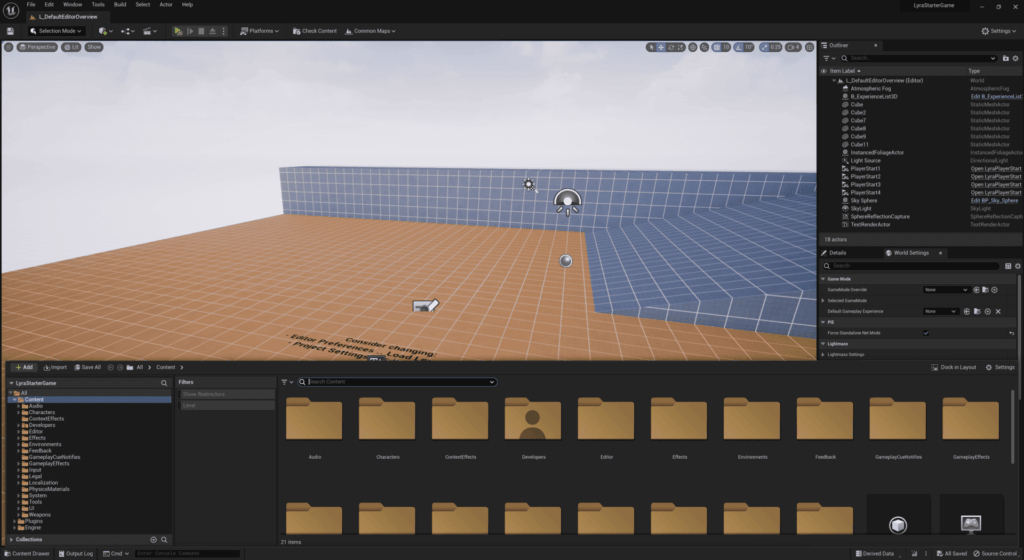
- מספק ויזואלי editor for composing UIs (Widget Blueprints).
- אינטראקטיביות מתווספת באמצעות Blueprint סקריפטים או פונקציות C++ מקושרות.
- Recommended for most HMI projects since it shortens iteration and enables collaboration between designers and developers.
תמיכה ב-MVVM:
- UE5 מציגה MVVM framework for UMG. Developers define ViewModels in C++ or Blueprints, which feed data into UI widgets.
- This brings Unreal closer to enterprise UI frameworks like Qt/QML, improving maintainability for large projects with complex state.
מודל רינדור:
- Slate/UMG widgets are drawn using Unreal’s deferred renderer or optimised UI renderer.
- יכול להטמיע 3D models, post-processing, particle effects, or even full real-time environments directly in the UI.
- Automotive examples include 3D car renderings within dashboards (e.g., Lotus, GMC Hummer EV).
אפשרויות תכנות:
- C++ (Slate): Build custom SWidgets, override tick/paint, compose in layouts — used for bespoke controls.
- Blueprint (UMG): Drag/drop widgets, animate transitions, script interactions visually.
- היברידי: Use Blueprints for layout + interaction, while exposing data/models from C++ systems.
תמיכה בפלטפורמות וכלי עבודה
פלטפורמות נתמכות:
- שולחן עבודה: Windows, Linux, macOS (פיתוח).
- פריסה: Windows (incl. Embedded/IoT), Linux (customisable), Android, iOS, major consoles.
- רכב: Explicit support for Qualcomm Snapdragon Automotive platforms (Android or QNX), integration with QNX hypervisors for IVI systems.
- ניסיוני: WebAssembly builds for lighter demos, not production HMIs.
- Not suitable for MCUs or low-end systems — requires OS + modern GPU (Vulkan/DirectX/Metal).
יתרונות כלי הפיתוח:
- Unreal Editor: WYSIWYG design of UMG layouts, anchors, responsive design. Animate widgets directly in the editor.
- תרשימים: Node-based scripting for rapid prototyping and iteration. Designers can implement logic themselves.
- פריסה בלחיצה אחת: Package and push to Android tablets, IVI test rigs, or embedded Windows/Linux in seconds.
- פרופיילינג: Unreal Insights, GPU/CPU profilers, frame budgeting for boot and frame-rate targets.
- שיתוף פעולה: Built-in Perforce/Git integration; supports multi-disciplinary teams (artists, designers, programmers).
תכונות ייחודיות לרכב/HMI:
- מסלולי אתחול מהירים לתצוגות אתחול מהירות.
- Multi-display support (render one scene across multiple car screens or feed separate outputs).
- Android Single Instance Service for sharing one runtime across several HMI surfaces.
- Niagara VFX integration for animated charge indicators, particle effects, or dynamic backgrounds.
דרישות חומרה
- ממשקי משתמש ארוזים של Unreal הם כבד משקל: binaries in the 100s of MB, memory footprints in the 200–400 MB range.
- Startup time can be seconds, though Epic optimises for ממשקי HMI עם אתחול מהיר על ידי צמצום שיידרים/נכסים.
- Target hardware: mid-to-high end SoCs (e.g., Snapdragon 820a or newer) with GPU capability comparable to modern smartphones.
- לא ישים למערכות בעלות צריכת חשמל נמוכה במיוחד; אידיאלי עבור premium cars, simulators, or industrial HMIs עם סביבות עתירות GPU.
חוזקות
- נאמנות חזותית ללא תחרות: Photorealistic 3D, real-time lighting, reflections, shadows, post-processing. Unique among HMI frameworks.
- אינטראקטיביות בזמן אמת: Complex animations, physics-driven widgets, smooth 3D/2D transitions. Supports touch, controllers, gestures, voice.
- תהליך עבודה מונחה עיצוב: Designers can directly implement and test UI in-engine using Blueprints, reducing hand-off cycles.
- אינטגרציה עם סימולציה ותלת-ממד: Perfect for ADAS visualisation, training simulators, digital twins. Reuse of existing game/marketing assets.
- ביצועים חוצי-פלטפורמות: Optimised for 60 FPS rendering across platforms; leverages mature engine abstractions for input, rendering APIs, HDR, etc.
- עמידות לעתיד ויכולת הרחבה: Engine updates bring automatic access to next-gen GPU features. Can scale up quality with hardware.
- גישה למקור: Full engine source available for modification; enables deep customisation for enterprise HMI projects.
- תנופת התעשייה: Dedicated Epic HMI team, automotive showcases, Qualcomm/Epic partnerships; growing ecosystem of integrators (Elektrobit, Siili, etc.).
רישוי ומודל מסחרי
- רישיון: Free to use, with source code access via Epic’s GitHub.
- מודל תמלוגים: 5% royalty on gross revenue beyond $1M for commercial products sold. Internal or free apps are usually exempt.
- רכב וארגוני: Custom license terms negotiable — often flat fees instead of per-unit royalties (e.g., for GM Hummer EV HMI).
- תמיכה: Enterprise partners get access to Epic’s Custom License Program, including support, source-level assistance, and co-development.
- היבט הקוד הפתוח: Not open-source under FOSS terms, but full source provided to licensees; redistribution prohibited.
- התנסות: Free to prototype with no fees; commercial obligations arise only at productisation.
Unreal Engine’s Slate/UMG stack is best-in-class for high-end, visually rich HMIs. It enables photoreal 3D dashboards, rapid design iteration, and integration with advanced simulation or sensor data. The trade-offs: a large runtime footprint, demanding hardware, and licensing complexity. For premium automotive, aerospace, and industrial projects where immersive visuals and design-driven workflows are priorities, Unreal stands out as a uniquely powerful option.
בחירת הפריימוורק המתאים
No single framework is the “universal best.” The right choice depends on your device, your industry, and your team’s goals. Here’s how the major options compare:
Qt: The safe, versatile choice. Mature, feature-rich, and proven in automotive, medical, and industrial domains. It scales from MCUs to full Linux systems, with strong tooling and long-term support. Ideal when you need stability across varied hardware. Just account for licensing costs.
Slint: The lightweight newcomer. Compact footprint, Rust-friendly, and license-flexible. Best for smaller devices or when you want modern UI capabilities without the overhead of larger frameworks. Think of it as a leaner, open alternative to QML.
Flutter: Designed for polished UIs and rapid iteration. Great if you want app-like fluidity on embedded Linux or plan to reuse code across mobile, desktop, and embedded. Perfect for consumer devices and infotainment systems, provided hardware resources are sufficient.
React Native: Suited to mobile-first or Android-based devices, especially if you already have React expertise. Not the go-to for traditional embedded HMIs, but works well when your HMI doubles as an Android app or companion app.
ממשק Unreal Slate: For high-end, graphics-intensive projects. If you need cinematic visuals, 3D realism, or a “wow factor” (luxury cars, simulators, premium interfaces), Unreal stands apart. Overkill for simpler HMIs, but unmatched in the right context.


An embedded HMI UI framework is a software toolkit used to build the visual interface on devices like automotive dashboards, industrial control panels, and consumer electronics. These frameworks handle rendering, input, animations, and device communication, abstracting the complexity of different hardware targets so developers can focus on building the interface itself.
Slint is designed specifically for this scenario. It has a runtime under 300KB, uses a declarative language compiled to native code, and achieves 60 FPS performance on low-resource hardware. It is a practical choice when GPU availability is limited or memory budgets are tight.
Qt is a mature, cross-platform framework ideal for regulated industries requiring long-term support. It scales from microcontrollers to desktop systems using C++ and QML. Flutter uses Google’s custom GPU rendering engine and delivers smooth cross-platform performance, but requires GPU-capable hardware, making it unsuitable for MCU-based systems. Qt has broader hardware compatibility; Flutter prioritises animation quality and mobile-to-embedded code sharing.
Unreal Engine is the right choice when the interface requires photorealistic 3D visuals or real-time graphics. Premium automotive cockpits are the primary use case. The framework includes UMG for designer-friendly workflows and Blueprint scripting for logic. It carries a 5% royalty on revenue above $1 million, making it a commercial consideration for volume product lines.
Hardware constraints come first: footprint size, GPU availability, and processing power determine which frameworks are viable. Then consider your industry’s compliance requirements, whether your team has relevant expertise, licensing costs at scale, and the vendor’s long-term support commitment. There is no universally best choice — the right framework depends on the interaction of all these factors.
אנחנו כאן כדי לסייע בפרויקט ה-HMI שלכם
Przemyslaw Krzywania
מנהל HMI
arrow_circle_right המאמרים שלנו


