حوّل ترفيهك المنزلي مع Android TV: الدليل الشامل


يتحرك عالم التلفاز الذكي بسرعة فائقة، ورغم أن Android TV قد لا يكون اللاعب الأكبر من حيث الحصة السوقية، إلا أنه لا يزال قوة لا يُستهان بها.
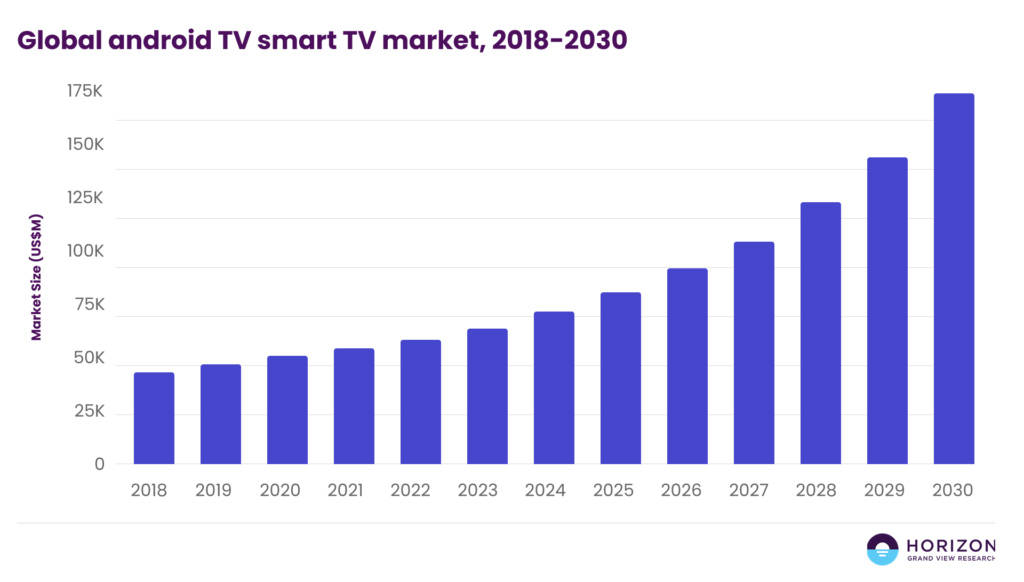
لنتحدث عن الأرقام قليلًا: حقّق سوق Android TV العالمي 77.7 مليار دولار في 2024، ويتوقع المحللون أن يصل إلى 189.4 مليار دولار بحلول عام 2030. وبالتالي، نحن نتحدث عن نمو يزيد على الضعف في ست سنوات فقط.
بالطبع، المنافسة تزداد حدة. نظام التشغيل Tizen من سامسونج يتصدر قوائم الأكثر رواجاً، نظام VIDAA (Hisense) استحوذت على 7.7%، ولاعبون أحدث مثل Titan OS (backed by brands like Philips) are moving at 4.9%. But here’s the thing about Android TV – while it may not have the most significant slice of the pie, its deep Google integration and developer-friendly ecosystem make it a compelling choice for content creators.
So, what’s this guide all about? We’ll walk you through everything Android TV offers, from its standout features to how it transforms any regular TV into an entertainment powerhouse. We’ll also dive into what it takes to build apps for this platform.
If you’re a content creator or media company eyeing that big screen real estate and wondering, “Is Android TV the right move for us?” This article should give you the clarity you need to make that call.
ما هو Android TV؟
Android TV is Google’s operating system designed specifically for televisions and streaming devices, transforming ordinary displays into comprehensive entertainment platforms. Built on the foundation of Google’s mobile Android system, this smart TV operating system has been optimised for a considerable screen experience, offering users access to thousands of applications, streaming services, and content libraries through a unified interface.
تعمل المنصة بوصفهاجسر بين المشاهدة التلفزيونية التقليدية والترفيه الرقمي الحديث. على عكس تطبيقات التلفاز الذكي الأساسية، يوفر Android TV بيئة كاملة الميزات where users can install applications from the Google Play Store, access streaming services, play games, and browse the internet directly on their television screen. This operating system supports أكثر من 10,000 تطبيق مصمّم للتنقل على الشاشات الكبيرة والتفاعل عبر جهاز التحكم عن بُعد.
Android TV وGoogle TV: ما الفرق بينهما؟
When researching Android TV, you’ll inevitably encounter “Google TV” and wonder what the difference is. The distinction is more straightforward than it seems, but essential for targeting connected television platforms.
Android TV is the foundational operating system – the core software that powers smart televisions and streaming devices. This operating system handles app management and essential functions, transforming regular TVs into connected entertainment platforms.
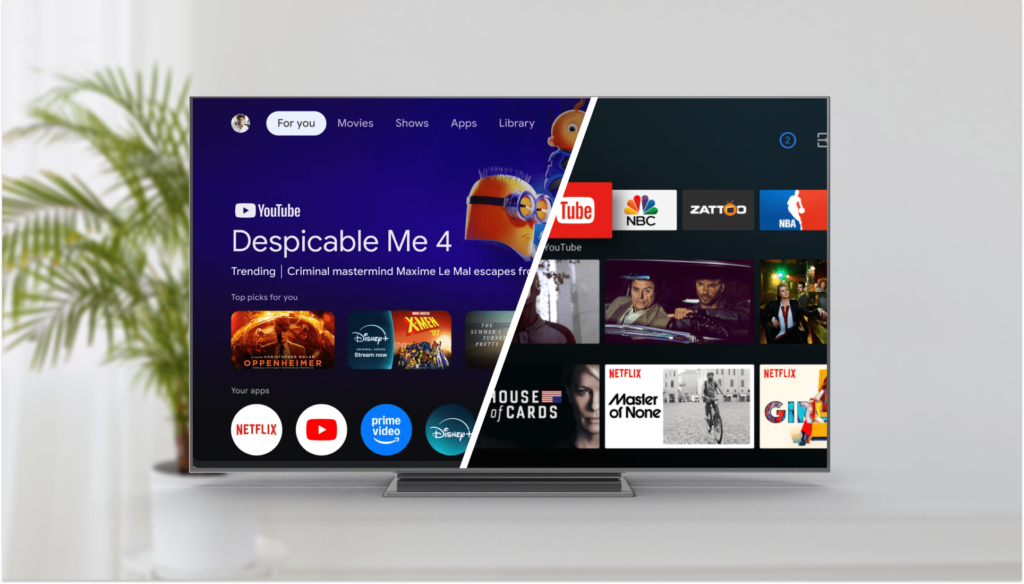
Google TV هو واجهة حديثة لنظام تشغيل Android TV. يعطي الأولوية لاكتشاف المحتوى على التنقل في التطبيقات، مما يخلق تجربة بشاشة واحدة تجمع خدمات البث المباشر والتلفزيون الحي والتوصيات المخصصة.
The key distinction is that all Google TV devices run the Android TV operating system underneath, but not all Android TV devices feature the Google TV interface. Many televisions still use the original Android TV launcher without advanced content aggregation.
For content creators, this means different user experiences depending on interface implementation. The Google TV interface enhances discoverability through unified search, while traditional Android TV devices maintain app-centric navigation. Both run on the same Android TV operating system, ensuring app compatibility across implementations, though optimising for the Google TV interface may provide better content discovery on the big screen.
المصادر: https://tv.google/ & https://variety.com/
لقد ساعدنا علامات تجارية على النجاح على Android TV – وقد تكون علامتك التجارية التالية
اعرف المزيد
الميزات الرئيسية لـ Android TV
Understanding what sets Android TV apart reveals why this operating system has become essential for content creators targeting the big screen. These core capabilities transform ordinary televisions into comprehensive entertainment and smart home platforms.
نظام بيئي ضخم للتطبيقات
Android TV provides over 10,000 applications specifically optimised for television screens. This extensive library includes major streaming platforms like Netflix, Disney+, Prime Video, and YouTube, alongside gaming, fitness, and productivity applications. The platform creates a comprehensive content foundation that rivals traditional cable offerings.
دمج التحكم الصوتي من Google assistant
Google Assistant serves as the primary interaction method beyond traditional remote navigation. Users can search for content, control playback, manage smart home devices, and access information using natural voice commands. The built-in voice control functionality supports multiple languages and understands contextual requests like “Show me action movies from 2023.”
إمكانات Chromecast المدمجة
Every Android TV includes built-in Chromecast functionality, enabling seamless content casting from smartphones, tablets, and computers directly to the big screen. This eliminates the need for additional hardware while allowing users to share photos, videos, music, and applications from mobile devices. Mobile devices can also be virtual remotes through dedicated Android and Google TV mobile applications.
دعم الصوت والفيديو عالي الجودة
Android TV supports advanced visual and audio technologies, including 4K Ultra HD, High Dynamic Range (HDR), Dolby Vision, and Dolby Atmos. These capabilities ensure content creators can deliver cinema-quality experiences with vibrant colours, deep contrasts, and immersive surround sound directly to viewers’ living rooms.
تكامل مركز المنزل الذكي والبث التلفزيوني المباشر
Beyond entertainment, Android TV is a smart home control centre, allowing users to manage connected devices, including lights, thermostats, and security cameras, through Google Assistant. The platform also combines traditional live TV programming with streaming content, aggregating أكثر من 800 قناة مجانية من خدمات مثل Google TV Freeplay وPluto TV وTubi إلى جانب المحتوى المميز بالاشتراك عبر واجهة موحدة بشاشة واحدة.
الألعاب والمحتوى التفاعلي
Android TV supports gaming controllers and offers access to Google Play Games, making the big screen suitable for casual gaming experiences alongside traditional entertainment. This gaming capability eliminates the need for dedicated consoles for lighter gaming content while providing developers another platform for interactive applications.
كيف تبدأ في تطوير تطبيقات Android TV
Building apps for Android TV is surprisingly straightforward if you’re already familiar with Android development. You’re essentially using the same tools and knowledge you already have, adapting them for the considerable screen experience.
The main difference is how users interact with your app. Instead of tapping and swiping, people sit on their couch using a remote control with directional buttons. This means you must think differently about navigation and ensure everything works smoothly with just up, down, left, right, and select buttons.
يمنحك تطوير تطبيقات Android TV خيارين رئيسيين لبناء الواجهات:
- Jetpack Compose للتلفاز إذا كنت تريد مكونات واجهة مستخدم حديثة تعريفية
- مجموعة أدوات واجهة Leanback لمزيد من تخطيطات التلفزيون التقليدية
كلا التصميمين مُخصصان تحديداً لمسافة المشاهدة تلك التي تبلغ 10 أقدام، حيث يمكن للناس رؤية تطبيقك والتنقل فيه بشكل مريح من الجانب الآخر للغرفة.
You’ll also need to handle some hardware limitations. TV devices don’t have touchscreens, cameras, or GPS like phones, so your app needs to either work around these missing features or detect when they’re not available and adjust accordingly.
The good news is that Android automatically handles much of the heavy lifting for navigation between UI elements. You just need to ensure your app looks good on the big screen, has clear focus indicators so users know where they are, and follows predictable navigation patterns that feel natural with a remote control.
الاختبار واضح ومباشر تماماً. يمكنك إما توصيل جهاز Android TV فعلي أو استخدام محاكيات التلفزيون في Android Studio لمعرفة كيفية أداء تطبيقك على تكوينات تلفزيونية مختلفة.
هل أنت مستعد للسيطرة على الشاشة الكبيرة؟ لنبنِ قصة نجاحك على Android TV
يمثل Android TV فرصة كبيرة لمنشئي المحتوى وشركات الإعلام الذين يسعون للوصول إلى الجماهير على الشاشة الكبيرة.
Whether adapting existing mobile apps or building from scratch, the Android TV operating system offers the tools and frameworks to create engaging big-screen experiences. The key is understanding the unique interaction patterns, navigation requirements, and hardware considerations that make TV apps successful.
Ready to bring your content to the big screen? At Spyrosoft BSG, we specialise in Connected TV app development and can help you navigate the entire process, from initial strategy to app certification across multiple platforms. Our team has deep expertise in Android TV app development and can accelerate your time to market while ensuring your application meets industry standards.
استكشف خدماتنا وكيف يمكننا مساعدتك في الاستفادة من هذه الفرصة السوقية.


Android TV is Google’s operating system built for televisions and streaming devices. Google TV is a newer interface layer that sits on top of Android TV, prioritising content discovery over app navigation. All Google TV devices run Android TV underneath, but not all Android TV devices have the Google TV interface. The distinction matters for developers targeting different user experiences.
The global Android TV market generated $77.7 billion in 2024 and is projected to reach $189.4 billion by 2030. The platform supports over 10,000 applications designed for large-screen navigation.
Android TV integrates Google Assistant for voice control and smart home management, includes Chromecast Built-In for casting from mobile devices, supports 4K, HDR, Dolby Vision, and Dolby Atmos, and aggregates over 800 free channels alongside premium subscriptions. It also supports gaming controllers and Google Play Games.
Developers use either Jetpack Compose for TV or the Leanback UI Toolkit for traditional TV layouts. The critical design difference from mobile development is that remote control navigation replaces touchscreen interaction. Interfaces must be optimised for directional buttons and 10-foot viewing distances, which changes layout, typography, and focus state requirements significantly.
It depends on your audience. Android TV’s deep Google integration and developer-friendly ecosystem make it strong for global content distribution. The combination of a large app catalogue, voice assistant integration, and smart home compatibility makes it a viable primary target, particularly for international audiences.
arrow_circle_rightاتصل بنا
هل تريد الوصول إلى ملايين المشاهدين على Android TV؟ لنتحدث!

بارتوميي لوزيا
الرئيس التنفيذي لـ Spyrosoft BSG
arrow_circle_right مقالاتنا


