How to use Salesforce Service Cloud Voice for customer service in 2026


Customer service now happens across many channels, including email, messaging, self-service portals, and other digital touchpoints. Voice, however, still plays an important role, especially when customers need immediate support or when an issue is simply easier to resolve through a conversation.
For service teams, the challenge is not only handling calls efficiently; it is also making sure those conversations connect with the customer information, cases, and processes already managed in Salesforce.
Salesforce Voice, formerly Salesforce Service Cloud Voice, brings telephony into the Salesforce service environment. It connects calls with customer records, cases, routing, and other service workflows, giving agents access to the information they need without constantly switching between separate CRM and telephony applications.
The platform has also evolved over the past few years. Depending on their requirements and existing technology stack, organisations can use Salesforce-native telephony, Amazon Connect, or supported partner telephony solutions. Features such as real-time transcription, conversation intelligence, and Agentforce can also support agents during calls and help automate parts of the service process.
In this guide, we look at how Salesforce Service Cloud Voice works in 2026, the available telephony options, how Omni-Channel supports call routing, where Einstein Conversation Insights and Agentforce for Service fit into the setup, and the main areas to consider when planning a Service Cloud Voice implementation.
What is Salesforce Service Cloud Voice?
Before Service Cloud Voice, many organisations connected their phone systems to Salesforce using the Salesforce Call Center framework and CTI adapters. This allowed agents to make and receive calls from a softphone inside Salesforce, but the telephony platform and CRM were still largely separate systems.

Service Cloud Voice takes the integration further. Service Cloud Voice brings voice interactions into the Salesforce data model and service process instead of limiting them to an embedded phone panel. Salesforce can link calls to customer records, routed through supported service workflows. and used together with capabilities such as transcription, automation, and conversation intelligence.
This also gives organisations more flexibility in how they design contact centre. They can use Salesforce’s native telephony offering, build on Amazon Connect, or connect a supported third-party telephony provider. The choice affects available features, technical ownership, and the level of integration work required.
For that reason, moving from a traditional Salesforce CTI integration to Salesforce Voice is not simply a change of phone interface. It can involve rethinking routing, call flows, data, agent workflows, and how voice fits alongside the organisation’s other customer service channels.
How does telephony connect to Salesforce?
One of the first decisions in a Salesforce Voice project is what happens to the existing telephony setup. Some organisations are starting from scratch, while others already have Amazon Connect or another contact centre platform they want to keep.
Salesforce currently supports four main approaches:
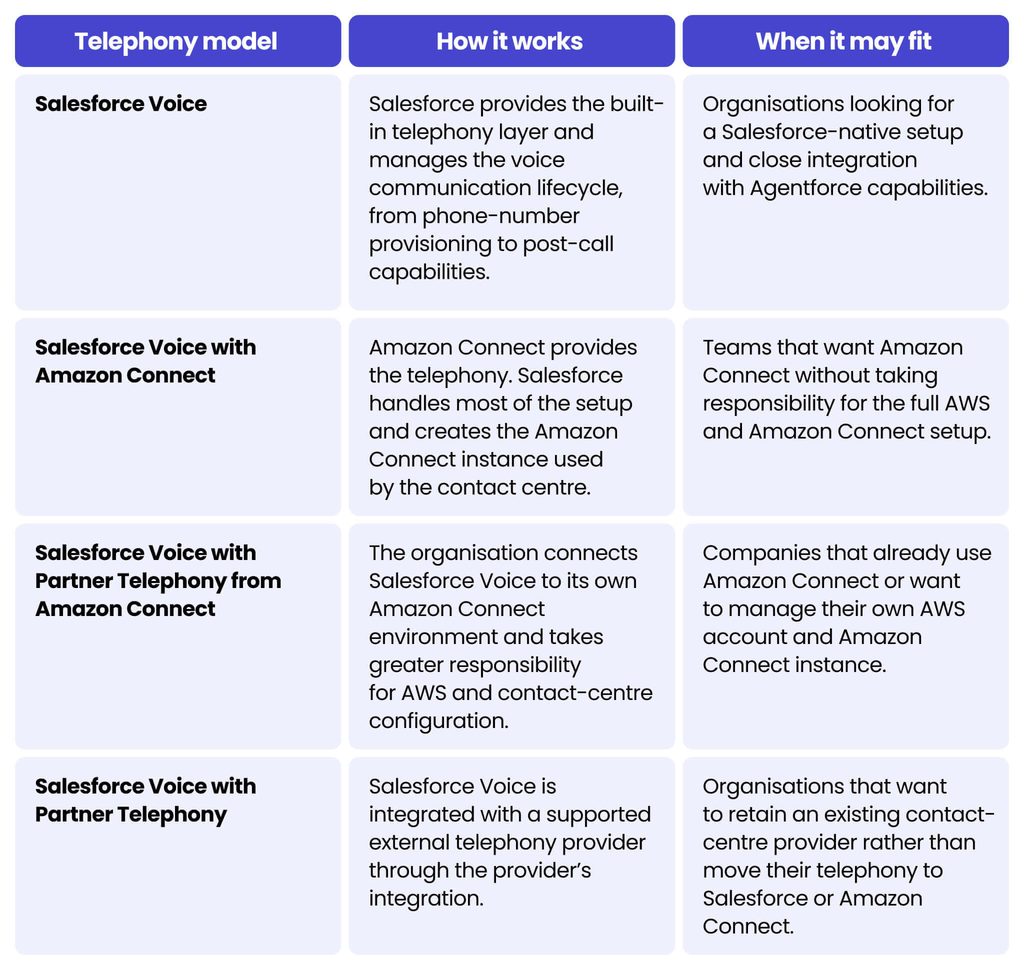
For an Amazon Connect Salesforce integration, the main distinction is ownership: Salesforce Voice with Amazon Connect involves more Salesforce-managed provisioning, while Partner Telephony from Amazon Connect gives the organisation greater control over its AWS environment. Companies looking for a BYOT Salesforce approach can instead use supported Partner Telephony.
How does Salesforce Omni-Channel routing work with Voice?
After connecting telephony, the next question is how calls reach the right agent. This is where Salesforce Omni-Channel becomes an important part of the contact centre setup.
Salesforce supports several ways to route voice calls. With Unified Routing, Omni-Channel can manage voice alongside other work, such as messaging and cases, and using the same view of agent availability and capacity. Other setups can leave routing with the telephony provider or split responsibility between Salesforce and the external platform.
The right approach depends on the telephony provider and how the contact centre operates.
Omni-Channel flows can also control what happens when the system assigns a call. They can route work based on queues or skills and open relevant records when an agent accepts the call. Instead of searching manually, the agent can see information such as the customer record or an existing case as the conversation begins.
This helps teams coordinate voice with the wider service workload. Our guide to different Salesforce cloud tools explains how these capabilities fit into the broader Salesforce environment.
How do transcription, Einstein Conversation Insights, and Agentforce work with Voice?
Salesforce Voice can do more than connect and route calls. Depending on the telephony setup, it can also capture conversations, analyse them, and use AI to automate selected customer interactions.
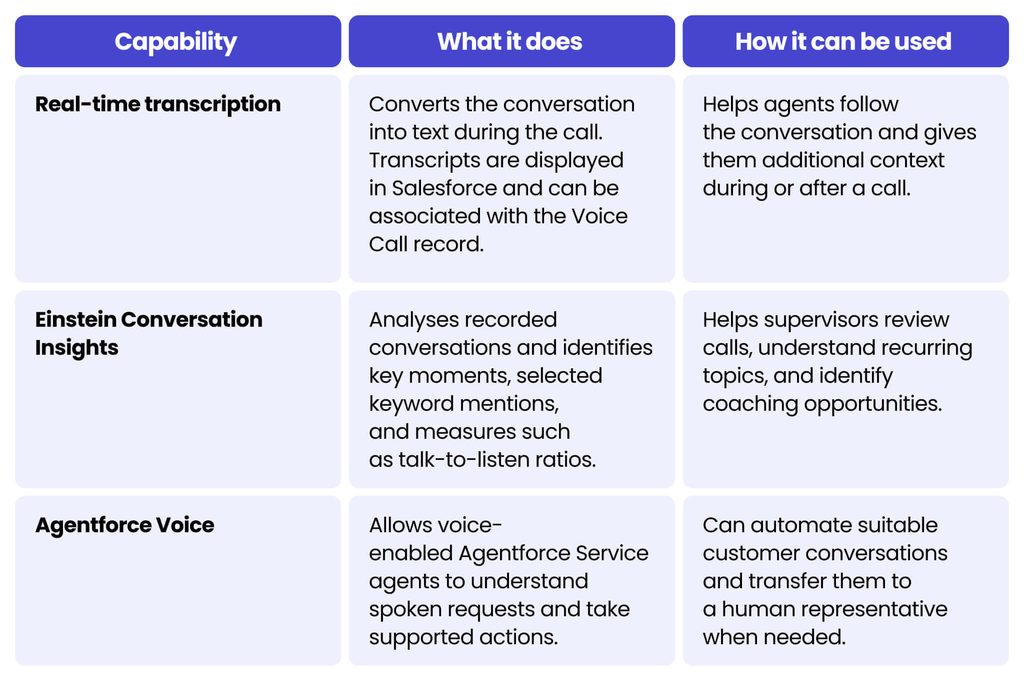
These capabilities solve different problems. Transcription captures the conversation, Einstein Conversation Insights helps teams analyse recorded calls, and Agentforce Voice understands spoken requests and takes supported actions. Together, they can facilitate Salesforce AI customer service, depending on the telephony setup and use case.
What should you plan before implementing Salesforce Service Cloud Voice?
Before starting a Service Cloud Voice implementation, it is worth checking a few practical areas first:
- Choose the telephony model. Decide between Salesforce Voice (Native Telephony), Amazon Connect or a supported partner provider. This affects the setup, available features, and technical ownership.
- Review the existing contact centre. Check current phone numbers, IVR, queues, routing rules, integrations, and reporting before deciding what needs to change.
- Plan real customer journeys. Cover routing, transfers, callbacks, and what happens when no agent is available.
- Check technical dependencies. Review Salesforce permissions, automations, integrations, data quality, and network readiness before development starts.
- Define ownership after launch. Amazon Connect may require AWS expertise, while partner telephony brings provider-specific requirements.
- Test before go-live. Test routing, transfers, permissions, and fallback scenarios, and make sure agents understand the new process.
If several teams or suppliers are involved, a clear multivendor Salesforce delivery model can help define responsibilities.
Teams should also include Voice in the wider Salesforce implementation plan rather than treated as a separate telephony project.
How much does Salesforce Service Cloud Voice cost?
Service Cloud Voice pricing depends on the telephony model and expected usage. Salesforce Voice for Partner Telephony starts at USD 50 per user/month. The Amazon Connect option starts at USD 75 per user/month for 750 platform minutes, with higher tiers available for 2,000 and 5,000 minutes. Salesforce provides a detailed comparison in its Service Cloud Voice pricing list.
With Amazon Connect, telephony minutes are billed separately from the Salesforce Voice platform minutes included with the licence. Therefore, additional usage and telephony charges should be considered when estimating the overall cost.
Pricing is subject to change, so current Salesforce pricing should always be confirmed before budgeting.
Final thoughts
Salesforce Service Cloud Voice can bring telephony much closer to the rest of the customer service process, but the value depends on how well the wider setup is designed.
The main decisions usually concern the telephony model, routing, ownership, and how much automation the organisation actually needs. A Salesforce-native setup, Amazon Connect, and partner telephony can all work well, but they suit different environments.
For organisations already using Salesforce for customer service, Voice can be a natural next step when calls need to be connected more closely with customer data, service workflows and AI.
If you are planning a new implementation or reviewing an existing setup, explore our Salesforce services. For ongoing optimisation and support after launch, Salesforce managed services can help maintain and improve the platform over time.
FAQ
Salesforce Service Cloud Voice, now referred to as Salesforce Voice, connects telephony with Salesforce customer service processes. It allows calls to work alongside customer records, routing, transcription, automation, and other service workflows.
No. Salesforce Voice can use Salesforce-native telephony, Amazon Connect, or supported partner telephony providers. The right option depends on the existing contact-centre setup, required features and how much of the telephony environment the organisation wants to manage.
Salesforce Voice provides the telephony layer used to manage voice interactions. Agentforce Voice adds conversational AI, allowing voice-enabled agents to understand spoken requests, use Salesforce data, and take supported actions during customer conversations.
Yes, for supported telephony setups. Transcription can appear in Salesforce during the call and be associated with the Voice Call record. The transcription technology and available features depend on the selected telephony provider.
Review existing Service Cloud configuration, data quality, integrations, automations, routing, permissions, and network readiness before implementation. A structured Salesforce audit can help identify issues that should be addressed before adding voice.


arrow_circle_rightContact us
Our experts will help you implement and tailor Salesforce to your needs

Michal Gronowski
Head of CRM Systems
arrow_circle_right Other articles